Category: General

Mobile network neutrality?

The core of the network neutrality debate is whether the people providing the 'pipes' - telecoms operators, in general - should be able to charge the big online companies, the Googles & Yahoos, for delivery of their content. If Youtube wants smooth playback of their videos on your screen, they may have to pay your broadband provider for a special quality of service.

Much of the controversy comes because this violates the 'end-to-end principle' which made the internet successful in the first place: the fact that you gave the network some data, and it did its best to deliver it, without any reference to what that data might actualy contain. Much of the innovation around the internet has only been possible because of this. Skype could not have become Skype if it had needed to ask permission from the network operators. The telecoms companies are now, partly because of the outcry, claiming that they're really talking about better delivery of new services, not about restrictions on existing ones, but many people see this as a slippery slope to a bad place.

This week's Economist has a good section on telecoms convergence, and I particularly liked this comment by Andrew Odlyzko:

The telecoms firms could even find that the boot is on the other foot, says Mr Odlyzko of the University of Minnesota. Referring to companies such as AT&T and Verizon, he asks: ""What makes them think that they are going to charge Google, as opposed to Google charging them?"" Cable companies, he points out, have to pay for the television shows and films they deliver over their networks.
It's a good point. I'm lucky in that it would be fairly easy for me to switch broadband provider, and one thing that would make me do so very quickly would be if my current provider became unable to deliver Google's services. In the mobile world, of course, changing provider can be rather easier. My new T-Mobile 3G connection, for example, allows me almost unlimited data but includes a specific clause that allows them to downgrade my data connection if the use of VOIP protocols is detected. They offer a noticeably more expensive connection that doesn't include this restriction. Interesting...
"The Device"

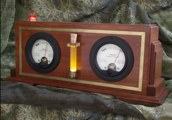
The DeviceThis is very cool and I wish I'd thought of it first. It will...

...keep track of several things that need metering. That includes anything from "CPU Usage" to eBay Auction Status" to our personal favorite, "The Current GDP of Uzbekistan." From what we can tell, "The Device" connects to your Windows machine (Mac / Linux support is coming soon, apparently) and displays some piece of data generated from your computer or culled from the internet.

Convergence

Well, this post comes via a 3G network, using my Nokia E61.

I'll write more about this device soon. It does so much more than my Blackberry - better sound, wifi connectivity, VOIP calls, lovely big screen and pretty decent keyboard, to name a few - but some aspects are noticeably more flaky or obscure.

I had my Blackberry up & running and doing what I wanted very quickly, whereas I've been playing with this device all weekend and still haven't quite got it as I want it. But that's partly because there is so much more you can do with this... I didn't spend much time configuring my BB to connect to my Asterisk server via wifi, for example! But the BB is basically an enhanced phone, where this is a very capable PDA, almost a tiny laptop, with a whole new operating system to learn - Symbian, in this case, which I'm much happier to have on my phone than anything from Redmond.

The main reason I wanted to try the E61 was to get 3G connectivity for my laptop, and it does that very nicely. It's also better for doing blog posts from the breakfast table! But for general ease of use, it's hard to beat a Blackberry.

Getting greener

I detect a worrying trend here.

It started when we got the 'green bin' recycling scheme, and Rose began pressuring me into recycling everything that could possibly be recycled. I grumpily acquiesced, but am now rather proud of the small amount of stuff in our non-recyclable bin when it's collected each fortnight.

Then we made a recent decision to start buying organic food when possible, despite the premium prices at Waitrose. This is the modern equivalent of tithing to the church, I guess, but we think of it as one of the little luxuries that you're allowed when you don't have children to feed as well!

And now we even have a box of local vegetables & fruit delivered by the nice people at the Cambridge Organic Food Company.

But no, I'm not about to grow a beard, and any Birkenstock representatives considering contacting me as a result of this post should think again. Sometimes, though, this green stuff provides me with an excuse to buy gadgets. Actually, almost anything provides me with an excuse to buy gadgets. That's another thing you can do when you don't have kids.

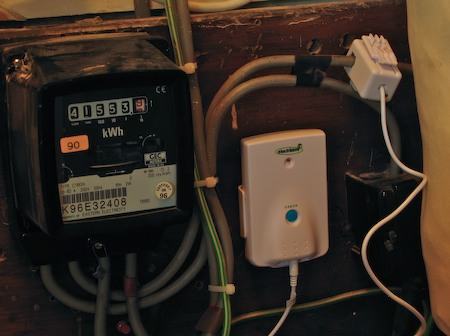
This particular toy is a sensor which clips onto the main power lead coming into my house:

Electrisave sensor

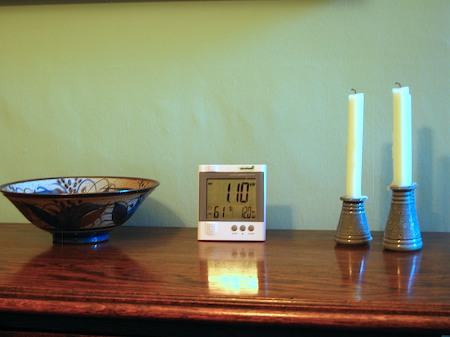
and provides a nice little wireless display telling us how many kilowatts we're currently using. Just about 1.1, at the moment:

Electrisave display

It can also tell us in pence per hour, or tonnes of greenhouse gas per year, should we so desire. It's also a temperature and humidity display. Quite sweet. It would take a long time, I think, for me to save sufficient electricity to pay for it, but every little helps... It's an Australian invention, called an Electrisave over here, and is available in the UK from their site, or, more cheaply, from British Gas.

Gutenkarte

Gutenkarte takes texts from Project Gutenberg and links them to map data from Metacarta - the idea being that as you're reading The Odyssey, for example, you can easily find the places on a map. I think this is a great idea.

Unfortunately, the parser can be a little over-enthusiastic. I doubt that the Court of Chancery referred to in Around the World in 80 Days actually took place in Chancery, France. And even Phileas Fogg, when talking about the West End, probably wasn't referring to West End, Alabama.

Similarly, when the Martians in War of the Worlds emit their haunting cry, "Ulla, ulla, ulla!", it hadn't occurred to me that they were in fact pining for a small town in Southern Ireland.

I think this needs some community-based human editing à la Wikipedia - and that is in their plans.

The interface is a little strange, too - you have to start with the map and work back to the text, where I would have thought the other way around was more natural.

But it's a cool concept...

Mojopac on the Mac revisited

I wrote a few days ago about Mojopac, and whether we might get something similar on the Mac. Steven Talbott pointed me at this interesting patent that Apple was granted yesterday which covers, very approximately, keeping your home directory on an iPod and being able to log in to a machine using that account when you plug the iPod in.

The Hole in the Wall

I think this article is a fascinating and enjoyable read. It's a few years old, but I hadn't come across it before.

An Indian physycist, Sugata Mitra, installed a PC with a fast internet connection in the wall of a building in New Delhi. He just left it there, with no explanation, to see what the kids growing up in the slums would make of it. What do you call a mouse pointer, for example, if you don't even know that the thing you're using is called a mouse?

Public enemy no. 1?

David Linhardt, a notorious Chicago-based spammer, is suing the anti-spam organisation Spamhaus for nearly $12M in lost earnings.

This is ridiculous enough, but his suit is made more complicated by the fact that Spamhaus is based in the UK. Hurrah!

Now, however, thwarted by the fact that the UK seems to be outside the jurisdiction of the Illinois courts, it seems that Linhardt is trying a new tactic. Mmm. How to win friends and influence people in the 21st century...

Networked scanner and Mac OS X

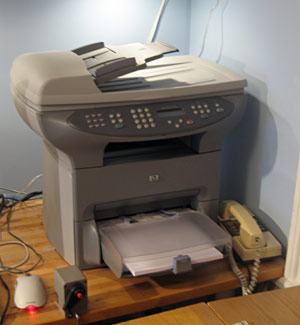
HP Officejet 3330In the corner of my home office, there sits an HP OfficeJet 3330. I'm rather fond of this beast - it has provided us with a copier, scanner, fax and laser printer (albeit b&w) at home for a very reasonable price, and has never given us any trouble. There's a JetDirect box stuck to the back so that it's on the network and we can print to it from any machine in the house.

As an aside - I never realised just how useful having a copier at home could be until I got one. Here's an example: I occasionally like going for longish walks around the Cambridgeshire countryside on Sunday afternoons. I used to stuff a guide book in one pocket and an Ordnance Survey map in another. Now, I just photocopy a couple of pages and the relevant bit of the map. Much easier to deal with in rain or a high wind...

Anyway - the HP software is laughably bad, but we normally only need the printer driver which works just fine. Occasionally, though, I need to scan things. I forget whether there was no HP Mac software which worked with networked scanners, or whether it was so bad that I abandoned it, but for years I've been using the web interface to do any scanning. Not very flexible or convenient, but it worked.

Today, however, Dave Hill showed me a much better way, albeit rather more complex to set up. Those who are unlikely to want to try this should probably move on to John's blog at this point!

Can you do this and keep sane?

Basically, you use the Open Source SANE project, which supports a wide range of scanners connected in a variety of ways, and you combine it with Mattias Ellert's excellent TWAIN SANE Interface for Mac OS X, which can make SANE-connected scanners appear as TWAIN devices - the standard that most programs expect when talking to scanners.

You can do this all on the Mac itself, though I followed Dave's setup and used a Linux machine to provide the SANE service, which then allowed software on the Linux machines as well as on the Macs to make use of the scanner. I won't go into full details here - you can find out more from the links above - but the basics for my system are:

  • The Linux machine connects to the OfficeJet over the network using the hpoj driver

    Install sane and saned on the Linux box. In the unlikely event that your Linux distribution doesn't include it or offer a convenient package to install it, you can try the SANE project site. Make sure that hpoj is listed in /etc/sane.d/dll.conf. If that's the only scanner you want to contact, you can comment out everything else. You'll need to do something to register your particular scanner device; on my Ubuntu machine this involved running /etc/init.d/hpoj setup and entering the IP address. The scanner should now be available to Linux software; try running scanimage -L and you should see it listed. The HPLIP project may provide an alternative to HPOJ if wanted.

  • The Linux machine shares it on the network using the SANE daemon saned.

    Edit /etc/sane.d/saned.conf and specify that machines on your network will be allowed to connect via SANE - the easiest way is just to put in a line containg a plus (+), which allows everybody. You need to make sure saned is running, typically by starting it from inetd as described in the man page for saned.

  • The Mac SANE backend is configured to connect to the Linux machine, where it can discover the shared scanners.

    Mattias has a page where you can download the SANE backend for the Mac and the TWAIN SANE interface as convenient packages. You need to edit dll.conf here as you did on the Linux box to tell the Mac where to look for scanners - of you're using Mattias's packages, it lives in /usr/local/etc. In this case the only line you need to have uncommented is 'net'. Edit net.conf and put in the name or IP address of your Linux box.

    You may also need to make sure that saned can be automatically run by editing /etc/services and /etc/inetd.conf, as you did on the Linux box..
  • The TWAIN SANE interface makes this available to Photoshop, Image Capture, Acrobat etc.
This sounds pretty convoluted, but it's not too hard, and it all works fine. You can also use the Linux box to share non-networked USB or parallel port scanners, and convert them into networked ones. If you want to do it all on the Mac without an intervening Linux machine, you'll need to find (or compile) a copy of the HPOJ driver for the Mac.

PocketMac update

If you're a Mac user and a Blackberry user, you might like to know that there's an update to the free PocketMac software which syncs the two. You can get it from the Blackberry.com site.

This is still far from perfect - in particular, it corrupted my Mac address book the first time I ran it, perhaps because the Blackberry went to sleep in the middle - I'm not sure. I strongly suggest you backup your Address Book and iCal before trying it for the first time - they both have easy backup options in their menus. I restored them, and did a one-way synchronisation, overwriting the Blackberry, which took a phenomenally long time.

Since then, it's been fine, if not speedy, and it has a lot of features not in the earlier version. Most important for me is the ability to have just a subset of your calendars on the Blackberry - vital if you subscribe to many calendars belonging to your friends and family.