Category: General

The touchscreen tax

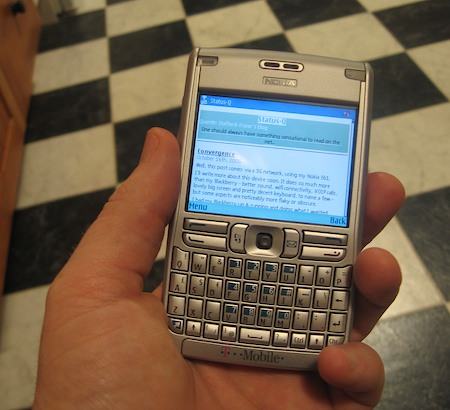
My Nokia E61 has a keyboard and a little joystick thingy. It doesn't have a touchscreen. This can be restricting for some applications but it has a major advantage, as Steve Litchfield points out: Screens without a touchscreen in front of them are much more readable in sunlight. He has some photos to illustrate this.

Samba and the French Cafe Technique

To the London LinuxWorld today, which seemed miniscule after the San Francisco one only a few weeks ago. I was surprised at just how small it was, given the importance of Linux to the UK, and the importance of the UK to Linux, but it was still interesting.

On the train I was listening to podcasts, as I often do now while travelling. That has been the biggest impact of the iPod for me personally: the fact that I no longer consider waiting time and travelling time as wasted time, even if I'm driving or walking and couldn't easily read a book. I spend much more time on my iPod listening to speech than I do to music...

Anyway, one of the interviews I listened to was with Jeremy Allison, a key developer of Samba. For those who don't know, Samba is free software which shares files and printers over a network using Microsoft's protocols, meaning that Windows machines can communicate with Macs, Linux & Unix boxes and a variety of other devices that use Samba under the hood. It's a very important piece of software, and I've been using it for about 11 years.

Of course, Microsoft don't publish the details of their protocols. If they had their way, then Windows machines would only be able to talk to other Windows machines. So Andrew Tridgell, the creator of Samba, has to work out what they're doing through a variety of cunning techniques. He wrote a nice article about how he does it. I particularly liked his description of what he calls 'The French Cafe Technique':

Imagine you wanted to learn French, and there were no books, courses etc available to teach you. You might decide to learn by flying to France and sitting in a French Cafe and just listening to the conversations around you. You take copious notes on what the customers say to the waiter and what food arrives. That way you eventually learn the words for "bread", "coffee" etc.

We use the same technique to learn about protocol additions that Microsoft makes. We use a network sniffer to listen in on conversations between Microsoft clients and servers and over time we learn the "words" for "file size", "datestamp" as we observe what is sent for each query.

Now one problem with the "French Cafe" technique is that you can only learn words that the customers use. What if you want to learn other words? Say for example you want to learn to swear in French? You would try ordering something at the cafe, then stepping on the waiters toe or poking him in the eye when he gives you your order. As you are being kicked out you take copious notes on the words he uses.

The equivalent of "swear words" in a network protocol are "error packets". When implementing Samba we need to know how to respond to error conditions. To work this out we write a program that deliberately accesses a file that doesn't exist, or uses a buffer that is too small or accesses a file we don't own. Then we watch what error code is returned for each condition, and take notes.

Still not quite foxy enough

Firefox 2 is out. Can't say I really notice much difference, but I thought 1.5 was just fine, so I'm not upset.

On the Mac, though, it still doesn't deal with RSS feeds as nicely as Safari, so it won't quite displace my default browser yet.

WindowDragon

Here's a neat utility I've just discovered which fixes one of the few things which bug me about the Mac user interface: WindowDragon.

It lets you assign mouse/key combinations to drag and resize windows without having to make your way to the title bar or the bottom right corner.

On my setup, for example, Ctrl-Alt-drag anywhere in the window will drag the window around. (Linux GNOME users, BTW, can also do this with Alt-drag). It's so much easier than normal, and so much more like moving bits of paper on a desktop. Try moving some things around on your real physical desk, only allowing yourself to grasp them by the top edge, and see whether you think it's a good interface...

I've also set Ctrl-Alt-right-drag to resize, and yes, you can do it from any corner or edge, or even anywhere vaguely in the vicinity of the corner or edge. Very handy, but I'm going to have to find a different combination when I'm using my one-button trackpad...

I thought this might be a good use of the squeezy side-buttons on my Mighty Mouse; you can use them if you set the mouse to treat them as 'Button 4'. I like the idea of 'grabbing' the window like that and moving it around, but I've never really been able to grip those buttons and use my mouse easily - they're just not quite in the right place.

You can disable WindowDragon for particular apps if you need the key assignments for something else.

Grancrete

GrancreteThanks to Dale Grover for pointing me at this article about Grancrete, a new type of spray-on concrete replacement which the developers claim could transform house-building in the developing world.

To build a house, you construct it out of polystyrene panels, cut holes where you want doors and windows, and then spray the panels, both inside and out, with Grancrete. The mixture is about 50% sand, 25% ash, and 25% their special binding compound. A few hours later, the house is usable, and the foam core of the walls makes for good insulation.

More info on the Grancrete site, especially the video page.

Clockwork Orange?

TangerineHere's a neat little free Mac app that's getting some attention: Tangerine.

It analyses the music in your iTunes library and works out the BPM (beats per minute) of each track. It's in beta at present, but works really quite well. There are multiple uses, but I guess the chief benefit will be for those who like to exercise to music and want to jog at a consistent speed!

I could use it to discover that the people running twice as fast as me are only doing so because they're listening to Hall & Oates' Maneater (179bpm) while I struggle along with Dylan's One More Night (89bpm).

Of course, if you're creating playlists of songs that blend into each other, you can juxtapose songs with a x2 speed multiple and they work rather well...

Making out?

Warning - geeky post ahead... I've been doing some coding this week...

Anyone who's done any programming, at least if it's outside the limited confines of an integrated development environment, will have come across the make utility, which was developed nearly 30 years ago at Bell Labs.

Make lets you list which bits of a program depend on which other bits, so that when you make a change, say, to one of your source code files, you can just type 'make' and the bits which need to be updated as a result all get rebuilt automatically.

People use it for other things, too; many years ago I had to produce Rose's PhD thesis through a rather complicated process which started with floppies from a dedicated Panasonic wordprocessor, ran through a C program I wrote to decode the disk format, a Perl script to convert the files to LaTeX, and then Latex itself and finally dvi2ps to get the Postscript output for printing! Each stage generated different files, updated tables of contents etc, and when she fixed a typo on her Panasonic, I needed to ensure that it was propagated through the entire pipeline and made it into print. Make was good for that.

But anyone who's built a project of any size will also know that make is far from perfect. It really hasn't evolved much in its thirty years and the syntax, while elegant for very small projects, becomes unintelligible for large ones.

Here's a small segment of a Makefile I was writing last week:

define PROGRAM_template
$(1): $$($(patsubst %,%_OBJS, $(notdir $(1)))) \\
        $$($(patsubst %,%_LIBS, $(notdir $(1))))
     g++ -o  $$@ $$^ $$($(patsubst %,%_LDFLAGS, $(notdir $(1)))) $(LDFLAGS)
all:: $(1)
$(foreach obj, $($(notdir $(1)_OBJS)), \\
     $(eval $(call OBJECT_template, $(obj),$(notdir $(1)) )) )
endef

# Build every program defined in PROGS
$(foreach prog,$(PROGS),$(eval $(call PROGRAM_template, $(prog))))
Don't bother trying to understand this. The point is that it's pretty arcane stuff and I wasn't trying to do anything too sophisticated here. If you've written Makefiles before you probably know roughly what's going on, but do you know exactly what's going on? Would you have got the right number of $ signs in the right places? Could you say why $$^ is in here and not $$< ? Why I have to call things and then eval them? Then try and imagine what it's like for somebody seeing a Makefile for the first time! And here's the worst bit: for this to work at all, the gap at the beginning of the 'g++' line must be a tab, not spaces. So simple code that looks perfectly correct may not actually work when you try to run it. It's a nightmare. So last week I decided that using make in the 21st century was probably ridiculous, and it was time to search for alternatives. An IDE like Visual Studio, XCode or Eclipse will often handle dependencies for you, of course, but even if everybody in your organisation can be persuaded to use the same one, it's not a solution for cross-platform work or when you need to distribute code to others who may not have the same tools. There are a huge number of alternatives to make out there; the ant tool is popular with Java programmers, for example, but I wanted a more general solution. And after reading many articles detailing others' experiences and recommendations, I opted to experiment with scons. And I'm loving it. Scons is normally taken to be short for 'software construct', though the name didn't quite evolve from that origin. But while it may lose out to make in the elegance of the name, it's superior in almost every other way. Scons is written in Python, making it easy to install and run on most platforms, and easy to extend if you need new features. More importantly, the SConstruct files, the equivalent of Makefiles, are also valid Python, meaning that they're very readable, and yet you have the full power of a programming language there if you need it. And not a '$$($(patsubst %' in sight! I don't want to go into too much more detail here about its merits, but if you're dealing with make on a regular basis, you owe it to yourself to look at scons. Read 'What makes Scons better?' on the site's front page. See what some users have to say about it. And then print a copy of the documentation to read on the train home, and check out the wiki. That's my recommendation, anyway. It's true that the majority of the world uses make. It's also true that the majority of the world used to use COBOL.
Perian

Mac users should check out the Perian project.

"Perian is a free plugin that enables QuickTime to play almost every popular video format."

A nice side-effect is that it also enables Front Row to play almost every popular video format. Like the ones that typically float around in Bittorrent space...

E61

Here's a picture of my Nokia E61, for those who haven't seen them in the flesh:

Nokia E61

Unusually for devices of this shape, it's not a bad phone. The sound quality and signal strength are really pretty good.

I think I may have to reach for a J2ME programming book to see if I can fix some of the shortcomings of the built-in software...