Category: Apple

Macs and stuff

Virtualisation continued

Just to prove it works, here's a screenshot of Ubuntu running in a VM window on my Intel Mac:
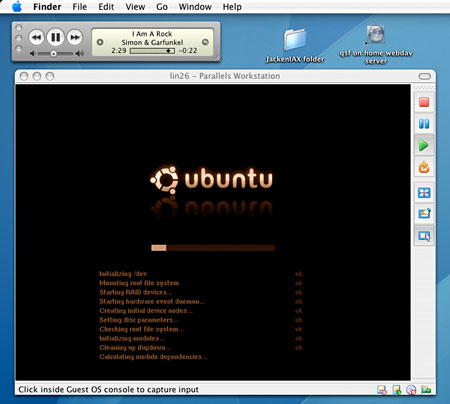
Parallels Workstation

This is using Parallels Workstation, which is still definitely beta, but shows lots of promise. I hope they make their money quickly, though, because it wouldn't surprise me if Apple included this functionality in the next release of their OS.

There are a benefits of this over BootCamp besides not having to reboot. One is that the disk image is just a file, and you can clone it and move it around - so you can run your virtual machine from an external hard drive, for example. Also, it can be substantially smaller - you have to set aside 10G or so for BootCamp, while my 4GB 'disk' for the virtual Ubuntu installation is actually less than 3GB on the disk - presumably because the disk isn't full and it does clever things with compressing sparse images.

I did a slightly more interesting experiment with this, too - see the Ndiyo blog for more info.

Boot Camp

Wow! This is really interesting! Especially since I've just got a new Intel-based MacBook.

My trouble is that I don't have enough disk space even for everything I want on Mac OS, let alone for another OS as well. It's the single biggest problem with having a laptop, I find...

From The Book

"Well,", said Sam Gamgee, "I'm back". And so am I, after nearly a month of travel; back to unpacking, clearing my in-tray (which now supports a pile of sufficient height that I'm hoping it may topple over and clear itself), and catching up with all the other things I should have been doing during March.

Of course, all of these might have been done more quickly if it weren't for the fact that my new MacBook Pro arrived while I was away, so the first thing I had to do after kissing my wife, of course, was to set that up. The Apple migration tools are very good; I just plugged the old laptop and the new one together during the installation, and all my applications, settings, documents, photos, bookmarks and so forth were copied across with no trouble.

So this is my first posting from an Intel-based Mac, and so far, everything is working very nicely.

The new power connector is very neat, but it does mean that all the old Powerbook power adaptors I have lying around won't work until somebody produces a convertor cable.

There are a couple of apps which don't work under the Intel and I'll need to wait for upgrades - NeoOffice and Final Cut being the main ones - but the fact that I've only hit a problem with these two is quite remarkable when you consider just how many apps and utilities on this machine were compiled for a completely different processor architecture. The Rosetta emulation technology is really very good and most normal apps and utilities just work.

Otherwise, frankly, it's not very different from my old Powerbook except that it's noticeably snappier and has a bit more disk space, and that's just fine with me! As the saying goes: If it ain't broke... just make it go a bit faster.

iPhoto Keywords

I like iPhoto, but I haven't really used the keyword facility much. Creating and assigning keywords is just a bit too much hassle.

So I was pleased to discover Ken Ferry's Keyword Assistant. Much easier.

Update: Keyword Assistant doesn't work on the more recent versions of iPhoto, but there are some tips here which can get it going again.

Apple ahead of Dell again

A couple of weeks ago we had the interesting news that Apple's market cap. exceeded Dell's.

They've crept ahead in another way too. According to this MacWorld UK article, Apple now has more of the education market in western Europe, at just over 15%.

In Switzerland, they have 54%!

Platform of choice

Once again, a certain platform was noticeably more popular than any other at the O'Reilly Emerging Telephony conference.

Christine Herron, pictured here in the glow of her screen, has been blogging the conference pretty thoroughly.

Tickr for Flickr

If you have a Mac and you don't need to get any work done for a bit... Tickr for Flickr is remarkably addictive. You type a word into its search box and it displays, along one side of your screen, a scrolling band of photos which have that tag on Flickr. It's very nicely done. If you want some good words to get started, try 'coniston', 'scuba' or 'night'...