True Colours
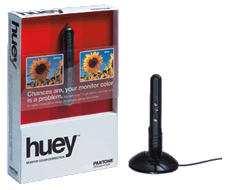 My latest toy: I've got a Pantone Huey, and it's great. Such devices have been around for a while, but most of them cost hundreds of dollars.
Now I can drag my photos from one display to the next, and they stay the same colour...
My latest toy: I've got a Pantone Huey, and it's great. Such devices have been around for a while, but most of them cost hundreds of dollars.
Now I can drag my photos from one display to the next, and they stay the same colour...
Quentin Stafford-Fraser's blog
One should always have something sensational to read on the net...
Macs and stuff
My latest toy: I've got a Pantone Huey, and it's great. Such devices have been around for a while, but most of them cost hundreds of dollars.
Now I can drag my photos from one display to the next, and they stay the same colour...
I've compiled mtr-0.71 it for Mac OS X, and you can get it here: mtr.zip.
The zip file contains a universal binary, a man page, and a README file telling you what to do with them.
If you like this, you might also like my ports of wget and bacula-fd.Ah, lots of fun stuff this weekend. Here's a great video clip showing what the kitten of today likes in the way of toys.
Thanks to Tom Coates for the link.I used to use a separate RSS reader in the early days of blogging, but stopped when Safari supported all the basic functions I needed, and did so very nicely. I've often considered switching to Firefox as my main browser, but I haven't seen any extension which does RSS as neatly as Safari.
Vienna might just be nice enough to persuade me that a dedicated reader is a good idea again, though, which would free me to consider other browsers. Worth a look, anyway.
Hah! That's nothing. See Giles Turnbull's post on 'Fast OS Switching'. "Until very recently, this sort of thing was just a daydream..."
I've also been doing some fun experiments with virtual machines.
What's this?
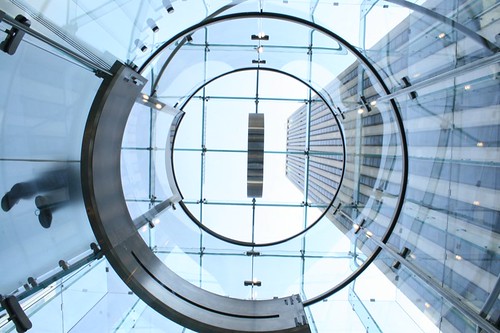
It's the entrance to a shop. Seen from below. It's part of an nice set of photos of Apple's new retail outlet on 5th Avenue, taken by Neil Epstein.
I also went to a Mac store today, in Palo Alto, to have a look at the new MacBook.
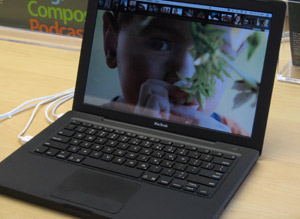
Much to my surprise, I found myself definitely drawn towards the black version, though not, I think, enough that I would pay the extra $150 Apple charges for black. I heard Tom Standage comment a couple of days ago that only Apple could charge for the colour that everyone else was using anyway!
The case has a slightly matt finish, so it's probably a different material designed not to show the scratches in the way that the black iPods did, and it may cost a bit more. Probably about $2 more.
But if the case is now matt, the screens are now glossy, in the style beloved of Sony and others. They make photos look very nice (unless you have fingerprints on your screen) but in general I'm not a fan because they reflect too much. Remember the old days of CRT screens when you had to position your computer so your back wasn't towards a window?
Otherwise, I think this is a lovely design at a reasonable price and deserves to do well. Anyone who's had to replace the hard disk inside one of Apple's other recent laptops will also really appreciate how easy it is on these in comparison.
Screencasts are very popular at present, and for obvious reasons; there's no better way to demonstrate the features of some software you've written, or to learn more about software you own.
Here's a new one by Allan Odgaard, the creator of the TextMate editor, which regular readers will know is one of my favourite pieces of Mac software. This one shows you some of the handy facilities for editing HTML in TextMate.The best way to keep up with new hints is through the TextMate blog.
The time has come. My old and beautiful DVD player - a Pioneer DV-717 for which I paid £600 a long time ago - is starting to fade. It lost the ability to play CDs some years back, and it's now regularly having problems with the scratches on rental DVDs as well, while other drives play them just fine. It was time to replace it. I could, of course, have bought a replacement at the supermarket for half the price I once paid for a region-free mod for my Pioneer. But they don't make them like they used to - anything looks like a piece of junk when placed next to the 717. And, anyway, DVD's are so last-decade....
So yesterday I went off to the Apple store to get a Mac Mini for use as a DVD/PVR/jukebox/digibox.
I already had one of Elgato's splendid firewire TV tuners, but I needed to buy a DVI-to-S-video adapter to connect the Mini to my TV, and I also got an external DVD writer. Why bother, you may ask, when the Mini has its own superdrive? Because I have a lot of DVDs from the US as well as the UK. When I started collecting, the choice was much greater on the other side of the pond. Now, sadly, getting firmware patches to remove the region lock on DVD drives ain't as easy as it used to be. But if you have two drives, you can use one for each region. The LaCie is also a more capable drive, and the package is a reasonably cost-effective way of purchasing Roxio Toast, which integrates nicely with the Elgato software. But I do hope those nice people who came up with the region-coding system will burn in hell for all eternity, or come to some other suitably sticky end...
In general, my first impressions are good. This is a 1.66GHz Core Duo machine, and it's very speedy. Apple's Front Row software is very slick, and Equinux's MediaCentral is a good clone with some extra features for those of you who don't have Front Row. It now also works with the Apple remote control if you have one.
It's a pity that Elgato's EyeTV software isn't integrated in some way with Front Row. This is Apple's fault, not theirs, I'm sure. But at present it means that I need two remotes for the one machine.
The other thing I'm finding is that packages which, unlike Front Row and MediaCentral, aren't really intended for viewing from the other side of the room, can be quite challenging on a TV. I don't have any reason to get rid of my perfectly functional old TV at present, and it may last for several more years. Which means that for a while I'll be using a conventional GUI at a resolution just below 800x600 on a screen which was never designed to display crisp text. This won't be an issue for those with new flat panel TVs connected via DVI or VGA, but it's a bit of a challenge for me.
There are starting to be some alternative programs which interface with EyeTV, and I can always VNC in and control it from another machine, but in the meantime I'm finding the keyboard-controlled zoom feature quite useful!
Otherwise, things are looking good so far. I'll keep you informed...
Ah... cool. Not only can you subscribe to Google Calendars using iCal but you can subscribe to iCal-published calendars from Google. When you go to add another calendar, you can choose to add one with a 'Public Calendar Address'. Simply put in the URL of the .ics file that you're publishing from iCal, and it works fine.
And there's an excellent new one about how to customise it which is well-worth watching, especially if a bit of shell-scripting doesn't disturb you.
Highly recommended.