MacFusion
And now it has a prettier front-end, in the form of MacFusion.
Quentin Stafford-Fraser's blog
One should always have something sensational to read on the net...
Macs and stuff
And now it has a prettier front-end, in the form of MacFusion.
Panic Inc have just released their new Mac application, Coda. This came to our attention initially because we're also developing something called CODA, albeit in a very different space. Pity, but there are lots of other codas out there (codi? codae?), so I guess there's room for us all!
Anyway, I had a bit of a play with Panic's app last night and it's very cute. Panic are the guys who make Transmit, widely acknowledged as the best FTP app for the Mac, or, it is generally agreed, for any platform. So new products are watched with interest.
CODA is an editor for web developers. It's not a Dreamweaver or anything like that, but for those (like me) who want to write HTML and CSS directly, it's a very nice package. When you open a 'site' you get tabs for source editing, CSS editing, preview, and an SSH terminal, all with file access provided by their FTP/SFTP/Webdav engine.
This sounds like the dreaded Swiss-Army-knife approach and could be a complex mess, but the creators have drawn it all together in a seamless and exceedingly elegant package, that I find rather tempting...
Here, and here are a couple of reviews if you want more details and some screenshots.A useful shortcut I've just discovered...
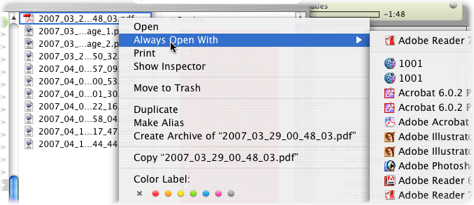
If you have a file that wants to open with a particular app, you can right-click and use 'Open with...' to pick a different one. If you decide you want to make that the default behaviour, you need to go into Get Info and select the application to be used for this file in future. Not exactly tricky, but a little long-winded.
I discovered this morning that if you do an Option-right-click, the 'Open with...' becomes 'Always open with...'. It sets the default and opens the file at the same time.
I always open PDFs using Preview, except for a few complex ones which require a full Acrobat Reader, because Preview is generally much faster. Occasionally, though, PDFs from other people or other apps open in Acrobat by default, and, since I normally realise this just as I'm abaout to double-click them in the Finder, it's handy to solve the problem quickly once and for all at that point.
Sad, but not entirely unexpected: AP report that Apple have delayed the release of the next version of their OS until October.
The reason given on their web site is that they needed to divert engineering effort to the iPhone to enable it to ship on time, and that was more important than updating the Mac OS.
After the taunts about the repeated delays in Vista, this is embarrassing, but it has to be the right choice.
John has a post quoting some interesting stats about Apple's iPod & other sales. More than 100M iPods sold, and going up fast!
Meanwhile, over on All About Symbian, Ewan Spence points out that 80M smartphones, capable of music and video, were sold in the last 12 months alone, half of them by Nokia. It may well be the case, I guess, that Nokia has sold more music-playing devices than Apple.
So the interesting question is why people don't use their phones for that purpose? Because the sound quality isn't so good? I doubt that's always the case. Because they don't come with stereo headphones? Because the Swiss Army knife approach to gadgets doesn't really work? Because they're not tied into iTunes and convenient syncing?
I've had several phones capable of playing MP3s but never even tried it. That is perhaps Apple's greatest achievement.
I'm one of the very many people who find Quicksilver to be the most valuable utility on their Mac, though I'm far from being a power-user. There are some people who start almost every activity with a Quicksilver keystroke, while I, for a long time, used it simply as a quick way to fire up apps that weren't quite important enough to go in my Dock.
Great though it is, however, it's far from being self-explanatory, especially for some of the more esoteric features! Fortunately, there are lots of tutorials out there from various enthusiasts to get you up and running. Some of the ones on Lifehacker.com are full of useful tips. You could do worse than starting here and following the links in the first paragraph. Even experienced users will probably learn something.
Or explore some of the Quicksilver-related screencasts on The Apple Blog or elsewhere. A Google search will find lots for you, and you'll soon be on your way to guruhood.
As everybody says, once you get used to it being on your Mac, you'll really miss it on machines which don't have it. And the best news? It's free!
As somebody who fires up a rather elderly copy of Photoshop at least once a day, I've been looking forward to the release of the new version - CS3 - and possibly to upgrading my entire package of Photoshop, Illustrator, and InDesign. There are plenty of nice new features, and, importantly, the programs will now be native Intel binaries so I won't be running them under emulation on my MacBook Pro. They're great products.
However, Adobe packages have always been expensive, and this is really rather expensive - a copy of the full suite would set me back nearly £1500 even though I'm upgrading. Plus VAT. I really can't justify that. Unfortunately, the package I bought came just before they started calling it 'Creative Suite' and so, even though I have all the apps, they're treated as individual apps and I don't get the 'suite' price for the upgrade.
So I started looking at alternatives - upgrading the individual apps rather than the whole suite, for example - and I can get most of what I need for rather less. But as I explored I discovered something sufficiently disconcerting that I didn't quite believe it at first: upgrades in the US are half the price they are here in the UK. Sometimes even less. Now, we're used to slight differential pricing here, but this is ridiculous.
Let me put it in perspective. If I want to buy a copy of CS3 Design Premium, I can just buy it here. Or I can go for a long weekend in New York next weekend, fly out on British Airways, stay three nights in a hotel on the upper west side, visit the Met, do a little shopping at Zabar's, and come back with a copy of the software in my suitcase. The price would be about the same, and I'm an existing customer buying an upgrade, not even paying the full price!
Fortunately I go to the States quite a lot, so I'll probably just buy a standalone upgrade to Photoshop while I'm over there. And Adobe, because of this daft policy, will fail to get quite a lot of my hard-earned cash. If only their business guys were as good as their software engineers.
See also this ZDnet report.

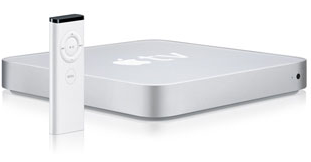
Well, that didn't take long. People are already opening up the AppleTV and installing extra stuff on it, like browsers, and Perian, which gives you the ability to play rather more video formats. There's a wiki with more info here.
Now, I have a Mac Mini under my TV so I don't need one of these. But I can think of a few nice uses for a box that size if somebody made it run Linux... which I'm guessing might not be too hard...
Here's one of those hints that will be blindingly obvious to those who know about it already, but may be very useful for people like me who have just discovered it...
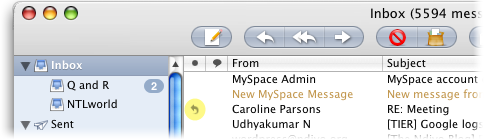
In Apple Mail, after you've replied to a message, you get a little indicator in the message list (assuming you have that column displayed):
What I've only just found out is that the little arrow is a button. Click on it, and it will pop up the reply you sent. Exceedingly useful. But you probably knew about that already...
If you have a phone which isn't supported directly by Apple's iSync, it may be supported by the extra plugins available for a few Euros from Nova media.
I've been using their Nokia E61 plugin for a while now, but I've just discovered they do Address Book plugins too, which enable the SMS-sending and other functionality. Good stuff.
No connection - just a happy customer