Category: Apple

Macs and stuff

Nokia Media Transfer for E61

In case anyone else is Googling for this...

Nokia have released the Nokia Media Transfer app which allows Mac users to copy media to their phones conveniently. Only certain phones are supported at present, but a few more than they let on... If you have an E-series Nokia it may be worth trying.

Basically, you install the application, let it search for your phone, and if it sees it but says it isn't supported, then quit the app and see if you can find a 'profile' file for your device here. Put it in /Library/Application Support/Nokia Media Transfer/Profiles and then remove anything in your ~/Library/Application Support/Nokia Media Transfer/ folder. Restart the application and you should find your phone is supported.

More info in this thread. Many thanks to all concerned- it works on my E61.

For whom the bell tolls

Today I spoke to a friend in Seattle who, I discover, has an iPhone. I heard it ringing in the background. That's about as close as we get to the action from here.

The somewhat embarrassingly geeky bit of this story is that I was able to recognise it as an iPhone ringtone even though I've never even actually seen one...

Phone records

It's now estimated that the iPhone sold more than 700,000 units in its first weekend. A few people are having trouble getting their account activated with AT&T, which is perhaps not too surprising... AT&T have never had any device sell that many units in its first month before.

iChat and USB cameras

Apple's iChat AV allows you to make video calls. I often have problems because I'm usually behind firewalls but when it works, it's very good. And most Apple machines have built-in cameras which make it a low-hassle process.

For those who have Macs without a camera, however, there's more of a problem, because Apple's (excellent if pricey) Firewire iSight camera was discontinued a little while ago, and iChat didn't support anything other than Firewire inputs. So what do you do if you have a Mac Mini? Or an older Mac without a camera? It's hard to find Firewire cameras these days, and using a camcorder is a bit messy.

Well, the good news is that, as of the 10.4.9 Mac OS X update, USB cameras are supported, at least if they're recent ones and conform to the standard USB 2.0 video protocols. The Xbox Live Vision Camera is confirmed to work, and I've just ordered a used one from eBay to try out.

(Other USB cams have been and are supported if you install third-party drivers, but drivers are not normally something that Mac users have to bother with, so we get out of the habit and view them with slight suspicion...)

Phone home

On Friday afternoon in the US, the iPhone will be launched, and one thing I've been wondering is how they're going to handle the paperwork for the thousands of people who will be queueing up for a new AT&T contract - the first obligatory accessory to the device.

Well, of course, it turns out that Apple won't require anything so last-decade as a signature on a piece of paper. From Steven Levy's review:

Instead of going through the usual complicated contract signing and credit-vetting ceremony with a fast-talking and slow-processing salesperson, Apple has come up with a startling idea: you simply buy the thing and go home. Then you open up the snugly fit black box - the design blitz at Apple begins with the packaging - and take out the handset. ... Setup is a snap. As with the iPod, the device is a satellite of Apple's free iTunes software. Plug the iPhone into a computer with your iTunes library (Mac or Windows) and the automatic sync function not only carries over your songs, videos and movies on iTunes library, but also photos, your contacts and calendar items. It also copies your e-mail address book and information onto your phone. This is one of the few phones that easily imports your information from your PC; because this is usually such a painful process, the vast majority of people with mobile phones never get around to moving over all their contact and calendar items. Signing up for phone service is easily handled in a straightforward process through the iTunes store.
The features of the iPhone have been discussed elsewhere in a phenomenal number of column inches and podcast minutes. As Leo Laporte says, this is perhaps, with the possible exception of the PS3, the most eagerly-anticipated consumer electronics device ever launched. But Levy points out that it may also have a huge impact even for those who don't splash out on this Mercedes of mobile devices:
In a sense, the iPhone has already made its mark. Even those who never buy one will benefit from its advances, as competitors have already taken Apple's achievements as a wake-up call to improve their own products.
And about time too.

Mac Video-handling Essentials

Final CutConverting video between different formats can be a challenging experience, particularly since it's also rather time-consuming. You may have to wait hours to find out that what you were trying didn't really work, and you have to start again.
Of course, there are lots of expensive high-end software packages which can do marvellous things, but there are also many utilities which can make the job easier at little or no expense.

These are some of the favourites in my toolkit, some of which will also work on non-Mac platforms:

  • Perian is a free QuickTime component which will allow you to play a variety of formats in anything that uses the QuickTime engine, including, of course, the QuickTime player, but also including FrontRow. I often download things from BitTorrent for viewing on a Mac Mini connected to my TV, and this is invaluable.
  • VLC (not to be confused with VNC!) The media player from the VideoLAN project will play almost any format out there, and is the thing I immediately turn to if QuickTime is defeated. But it has a lesser-known feature: it can also do conversions, and write the converted video to disc instead of playing it on the screen.
  • Handbrake rips DVDs to MPEG4s. Simple and efficient.
  • VisualHub brings together a bunch of conversion libraries into one, nice, simple package. Select the format you want and drop the files onto the window. The default settings are generally pretty good. You can get this functionality elsewhere for free, but the ease of use is well worth the $23.
  • CocoaJT is really designed as a viewer for streamed media from around the world, but I've never really used it for that. For me, the important feature is that it can also record those streams to disk. If you know the URL of a stream and want a local copy, this is the app for you.
  • Vixy.net. Flash Video (FLV) is becoming the dominant format on the web. 'Tis true, 'tis pity, and pity 'tis, 'tis true. One way to get those YouTube videos into another format, for example to play on a phone or iPod, is to use the online conversion service Vixy.net.
  • JW FLV player. If you need to embed a Flash movie in your page but want more control than you get from things like YouTube and Google Video, you can do it yourself. Create an FLV file using VisualHub and then get hold of Jeroen Wijering's Flash applet, which you can embed in your page and point at your FLV file. Free for personal use and very cheap for commercial.
I used a combination of the above, for example, to make my recent talks 'Changing the Face of the PC' and 'The Paper Renaissance' available here when they were previously only available in a streamed, Windows-only format elsewhere. I hope others find the list useful!

Beta-blocker

I've uninstalled Apple's Safari 3 beta, and gone back to version 2, at least for the time being.

The new one has some nice features, is noticeably faster, and has better JavaScript support. But it's also definitely still a beta, and crashed a couple of times, and seemed to have one or two interesting side-effects on things like iChat.

I find it interesting that, only a few years ago, a web browser was just an accessory, where it's now the most important app on my machine and needs to be pretty solid. But that also means I want a good, fast one, and this looked very appealing, so I'll be upgrading again as soon as the wrinkles are ironed out.

Surfin' Safari

Mmm. That's interesting. Steve Jobs has just announced the imminent release of the Safari browser for Windows - there'll be a beta release later today.

That's very smart. iTunes is one of the most popular Windows apps. It'll be interesting to see how Safari does... And anything which ups the market share of minority browsers is a good thing in my book.

Update: Safari 3 Beta is now available, from http://www.apple.com/safari/. This was posted with it. The Mac version, of course! It does seem rather snappier, and has a few nice features - the ability to rearrange tabs and tear them off to form separate pages is cool, and very nicely implemented. One thing I've often wanted is to be able to move a tabbed page from one window to another, so that windows are groups of pages on a particular topic. Now it's easy....

Custom disk icons

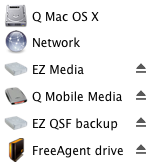
finder disk iconsIt's silly, I know, but I've started to create custom icons for the various external drives I plug into my MacBook Pro.

This is something I do rather regularly since the internal 100G drive only has about 3G spare, and I have to tidy things up frequently to keep even that much free! Most of my photos now live on a portable external drive which goes almost everywhere the laptop goes, and when I'm at home I plug in a couple of other drives as well.

Having pictorial representations of the disks in Finder windows and on the desktop makes it easier to know which ones are plugged in and turned on, and I'm much more likely to eject the right disk before unplugging it if they don't all have the same generic icon. It's a bit of effort to create the icons, but worth it, I think.

Here's how to do it.