Category: Apple

Macs and stuff

Slip Slidin' Away

My friend Ray Gordon recently gave me one of the most useful iTouch/iPhone hints I've had in some time. If you already know this, it is blindingly obvious, but if you don't, you definitely want to!
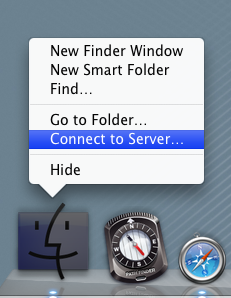
On the iPhone keyboard, you can tap the shift key to switch to caps, and the symbol/numeric key to switch to the layout that includes commas, hypens, numbers etc. But did you know that you can touch those keys and then slide your finger to the character you want? When you release, the keyboard reverts back to the mode it was in before. So if you want, say, to insert a hyphen or an apostrophe in the middle of a word, you need just one click-and-slide, rather than three clicks.

Try it and you'll never look back!

ClickToFlash

In general, browsing the web with Flash disabled makes for a more pleasant experience and saves a lot of horsepower on your machine. But it's a pain switching it on and off for those few sites where it's important.

ClickToFlash is a WebKit plugin which provides a convenient solution for Safari users. Flash content is replaced with a shaded image saying 'Flash'. If you click on it, the Flash is loaded and plays, and you can right-click to whitelist a site so that their content always works.

There are, apparently, still a few rough edges, but I'm going to try it for a while and see how it goes.

Expanding your horizons

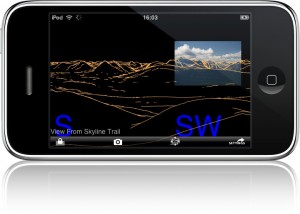
My friend Phil Endecott has just released a rather interesting iPhone app: Panoramascope.

It can identify the various peaks visible from your current location, which, if you start to think carefully about what that involves, is actually quite clever. And, if you take a photo with your phone, you can overlay the app's view on your photo.

If, like me, you live in a place where peaks are things you dream of going to see on holiday, it can have more prosaic uses, like telling you where nearby pubs or tourist attractions can be found. You can also save locations, so you can look fondly back at the view you had last summer from the top of the Matterhorn.

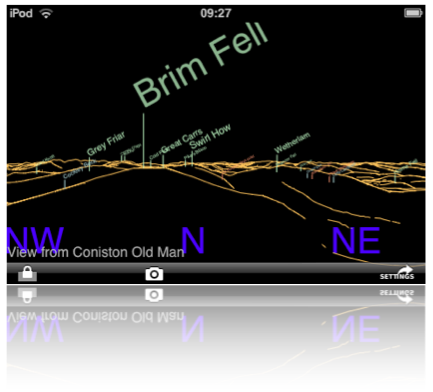
Start by loading some overlay sets - in my case, European placenames, peaks, and pubs - and then you can search for a location, which is generally much easier than entering latitude and longitude. Here's part of the view from Coniston Old Man:

This will work on an iPod Touch, but you really want an iPhone for the GPS and camera facilities.

Available from The iTunes store, of course, but there's a lot more information available at Panoramascope.com. Update: Ha! If the thought of viewing all those glorious peaks makes you feel exhausted, and you're more interested in the pub-finding options, Phil also has something just for you!

Drop it in the box

I've only just started playing with Dropbox, but it looks very cool.

It's what iDisk should have been. Software for Windows, Linux and Mac will create a Dropbox folder on your machine. Anything you drop on that folder is efficiently and securely synchronised to all other machines connected to the same account. It keeps past versions of updated files for you. The storage behind the scenes is Amazon's S3 service. And if you're using less than 2GB, Dropbox is free.

Here's a more detailed write-up by Ryan Paul.

Trading places

The Mac fansites are buzzing:

Apple has announced that Steve Jobs will not deliver the opening keynote presentation at the upcoming Macworld Expo in San Francisco on January 6th, 2009. Phil Schiller, Apple's senior vice president of Worldwide Product Marketing, will take the stage in Jobs' place. In addition, Apple announced that this is the final year in which Apple will exhibit at the Macworld Expo, pointing to the decreasing relevance of trade shows as Apple has expanded its direct contact with customers via retail stores and the company's website.

MacWorld is one of the biggest Mac-related trade shows and the Steve Jobs keynote has always been the highlight. Many new Apple products have been announced here in the past. This is a significant press release, but not just for Apple enthusiasts. Many others have commented on the declining relevance of the trade show/expo format, and having endured quite a number of them on a variety of subjects - albeit never an Apple one - I certainly wouldn't mourn their passing.

And that was when I was only a visitor. In January, though, we'll have a stand at BETT - the big UK jamboree for education-related technologies. The charges for our small stand are ludicrous - £120 per power socket, for example, and over £300 for the most basic internet connection. The plentiful spam, junk mail and telesales calls we've received since registering as an exhibitor are another disincentive ever to do this again. And that's just the start. Big companies like Apple spend many millions on attending such events.

So perhaps the trade shows are not long for this world. But, in the short term, it's still deemed to be an important way to communicate with existing customers and to reach new ones. We'll soon find out whether that's the case. Please do come along and see us at BETT. Remember how we suffer to be there for you!

Besides, you should visit these shows while they still last, so you can tell your children about them...

Calaboration

A few months back I wrote about the importance of Google's new support for CalDav, which allows you to edit and share your Google calendars in apps such as Apple's iCal. At Camvine, since then, we've been managing our company calendars that way, and it's worked very nicely, though it took a couple of minutes to set up iCal on each new machine because you had to enter complex URLs.

Now, I discover, there's a utility called Calaboration to do it for you; much more convenient.

If you're an iPhone/iTouch user... you can sync the calendars to the iPhone but it's one-way only - you can' t update them from there using the standard iPhone calendar app. However, you can of course use the web browser on the phone, which works quite nicely, or a third-party calendar utility like SaiSuke.

Mac tip of the day

Here's a simple keystroke that I find I'm using more and more:

Shift-Option-Cmd V

As I get older, I find it harder to remember long strings of modifier keys, so I think of this as 'V with everything except control'!

This does a paste from the clipboard without any formatting. In days of yore, most cut-and-paste operations were just plain text anyway but, increasingly, I'm finding that when I copy text from a webpage to an email, from a document to a blog post, and so forth, it brings across too much of the formatting with it and I end up with chunks in the wrong font size, or with funny line spacing etc. Occasionally this is useful, but more often than not I just want the plain text, or I want to control the formatting carefully.

That's when you need today's mantra: Cmd-C to copy, V with all but Control to paste!

Apple offering downgrades (thanks to DRM)

Fred von Lohmann of the EFF:

Once again, thanks to DRM, a new product ends up less useful than the one it replaces. This time, it's the new family of Apple Macbook laptop computers that gets the downgrade. When it launched the new Macbooks, Apple announced that they would sport a new digital video output connector, known as Mini DisplayPort. What Apple failed to mention, however, is that those connectors allow movies studios to force the computer to authenticate any external monitor before allowing playback of programs purchased or rented from the iTunes Store (Microsoft's Windows Vista does something similar). In other words, the HDTV monitor or projector that worked for you yesterday, won't work with your new computer tomorrow if Hollywood has embedded a flag in the iTunes content you paid for. This is a remarkably short-sighted move for both Apple and Hollywood. This punishes existing iTunes customers: several have reported that iTunes purchases that played on external monitors on their old Macbooks no longer will play on their new Macbooks. In other words, thanks to the Macbook "upgrade," Apple just "downgraded" everyone's previous investment in iTunes content (if we've told you once, we've told you a dozen times -- when you buy DRMd content, the vendor can snatch your investment from you at any time).
Full post here.

A sense of freedom...

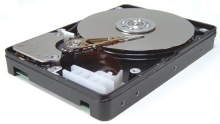
No, this is nothing to do with politics. It only needs much smaller things to make me happy... like the fact that I have a new hard disk in my laptop.

When I bought my MacBook Pro - two or three years ago, now, just after they first came out - I thought that a 100G drive equalled lots of space. Since then, I have gradually moved my video-editing stuff onto external drives, then my music, then my photos, and then quite a few of the larger applications.

But, despite regular cleanups, I kept finding myself running out of space. It's never really a good idea to run a filesystem with less than about 5-10% free, and I was regularly hovering around the 1% mark. So this week I called up the local Apple dealer, handed over a couple of hundred quid, and I now have 320GB to play with!

That doesn't give me enough space to put everything back on the internal drive, but it's a lot better than it was, and I can stop worrying about data corruption as my applications run out of swap space!

Aaaaah.

A tip, though - I has the OS installed on the new drive and used Apple's excellent Migration Assistant to copy stuff from the old drive to the new system - this brings across your user accounts and data, applications, network settings etc - all very smoothly.

However, it's really intended for those setting up a new machine and copying their data from an old one. As such, it doesn't assume that you have a licence on the new machine for any Apple pro apps - Final Cut, Aperture, Logic Pro etc. It copies the apps, but not the licences. So if you use this system to migrate to a new drive, remember that you'll need those serial numbers handy afterwards!