Category: Programming

Change management...

There's an amazing thing I've just discovered after installing an SSD in my laptop: Microsoft Office products now start up at a reasonable speed!

I've only just realised that, because I open them so rarely. (It's one of the joys of working for myself that I can largely pick the tools I use.) In fact, I realise, I probably download updates for Office components more frequently than I actually use them.

That's an interesting phenomenon; there ought to be a word for it. I'm probably unusual in having Microsoft Word work that way, but there are many of my lesser-used iOS apps that will be updated several times between successive actual executions of their code.

This is a real cultural shift from a world where big corporations would debate for months before rolling out an update to a program. On the web, we've grown used to the idea that a piece of software might not look quite the same the next time you log into it. But it's now true of many apps in my pocket: something will have changed in an app before I run it again. I could quite easily pull my phone out one day and discover that last night's update had broken something and I could no longer access the boarding pass I need for that plane...

I guess it's a tribute to progress in software development, or perhaps to the Apple software-approval process (a real pain for developers but in many ways a boon to customers) that this so rarely happens.

Keep the customer notified

Here’s a handy utility for those using Mountain Lion’s new Notifications system (something I find I rather like despite never really getting on with Growl).

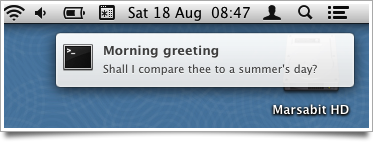
It’s called ‘terminal-notifier’ by Eloy Durán, and it lets you send these from the command line. So, for example:

   $ terminal-notifier \
     -message “Shall I compare thee to a summer’s day?” \
     -title “Morning greeting” -execute “open http://bbc.co.uk/weather/2653941”

This pops up a little notification, and clicking on it will take you to the BBC weather forecast for Cambridge.

You could put the command all on one line - I’ve just split it up with backslashes for readability. It’s easy to install terminal-notifier from the command line with:

  $ sudo gem install terminal-notifier

Now, as an illustration of why it can be useful, I wanted this for a particular purpose:

I’ve been experimenting more and more with Multimarkdown, since so much of what I write ends up in HTML, and the markdown syntax is a convenient way to create it. I have an Automator service which takes the currently selected text, for example in a blog post text-entry field, parses it as Markdown, and replaces it with the HTML equivalent. I’ve assigned it a keystroke, so typically I’ll just do Cmd-A to select everything I’ve typed and Ctrl-Alt-Cmd-M to convert it to nice HTML. Very handy. It’s how I wrote this.

Just occasionally, however, I might want to go back to the Markdown version, so before conversion the selected text is also copied into the clipboard. This is the kind of quick temporary backup that becomes second nature if you have a clipboard history utility. But it’s easy to forget this has happened.

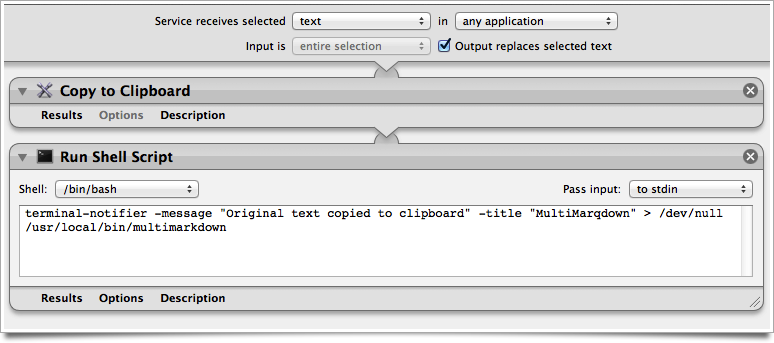
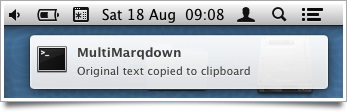
Now, I can just add a quick extra line in the automator script and I get a little pop-up to remind me, which vanishes again after a few seconds:

Thanks, Eloy!

Here's what the Automator service looks like, in case anyone wants to do something similar:

Customise app defaults with AppleScript

Nobody likes AppleScript. Well, almost nobody. It's an attempt to make a programming language look like a natural language, which means that knowing what constitutes valid syntax in any given situation is almost impossible. I once suggested that what the world really needs is a Perl-to-Applescript translator, because Perl is a language that's pretty easy to write but impossible to read, and AppleScript is easy to read but impossible to write. The syntax is a bit dependent on the apps with which you're trying to interact, too, and the debugging options are exceedingly limited.

But the most annoying thing is that, on occasion, it's exceedingly useful, and there aren't really good alternatives for the kind of things it can do.

So just in case anyone out there is googling for this kind of thing, here's how I made it change the default options on a dialog box that I use every day.

I've been inspired by David Sparks's e-book Paperless, and my new-found fondness for the kind of things you can do with the Hazel utility, to get a better, more automated workflow for scanning in documents.

A key component, of course, is that you want them to be OCRed so that you can search for them, or search within them, later. I want something that does this automatically, or can be made to do it automatically, when a scan ends up in a folder on my disk, with minimal manual intervention. Good OCR programs are fairly costly on the Mac - Abbyy FineReader, at £79, is generally agreed to do the best OCR job, but the Mac version is not very scriptable. PDFpen, at £47, does a reasonable job and has better scriptability, and if I were starting now I'd probably use that.

But a while ago I splashed out on NeatWorks, which has good OCR, plays nicely with my wonderful ScanSnap scanner, and provides a complete filing system for my documents, with flexible metadata options. It's a nice package. But the problem is that I no longer want a complete filing system for my documents - I want to do that myself.

So for the moment I'm using NeatWorks to capture my scans, OCR them, enter some metadata and then export them as PDFs to the folder where Hazel and other things take over. They typically stay in NeatWorks for about a minute.

OK - that was a long run-up to explain why I regularly - often several times a day, do File > Export... and get this dialog:
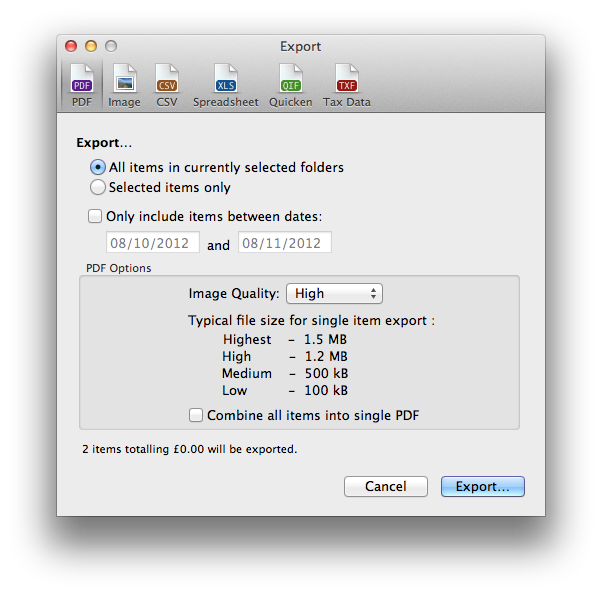
At this point I can almost just hit [Return], except for one problem: the default is to export all the items in the currently selected folders and I just want to export the thing I last scanned. So every time I do this, I have to switch from keyboard to mouse, click the little radio button by 'Selected items only' and then carry on.

AppleScript to the rescue! I used Automator to create a service that just applies to NeatWorks and runs the following AppleScript:
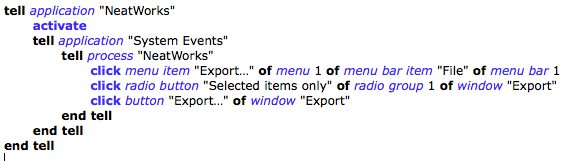
This runs 'File > Export...', clicks the appropriate radio button, and then clicks the Export... button.

Finally I used the Keyboard section of System Preferences to assign a keyboard shortcut to this service.

Now, I drop some paper into the scanner and press the button on the front. NeatWorks pops up and OCRs it. I type in a title, document date and any other keywords I fancy, then just hit my magic keystroke and check the name and folder before hitting return to save.

At that point, Hazel takes over and does something like "if this file was created by NeatWorks, and has a name containing the word 'Telemarq' and the word 'receipt', then file it away in the appropriate folder of my receipts directory with a suitably reformatted filename".
Raspberry Pi Webcam Viewer

I finally got a chance to play with my RaspberryPi, so I threw together a quick experiment.


Update: A few people have asked me for a little more information. I'm happy to make the source code available, but it's not very tidy and a bit specific to my situation... however, to answer some of the questions:

The enclosure for the Raspberry Pi comes from SK Pang Electronics, and it's perfect for my needs. You can buy just the perspex cover, but they do a nice Starter Kit which includes the breadboard, some LEDs, resistors and the pushswitch. Definitely recommended.

For the graphics, I used the PyGame library, which has the advantage of being cross-platform: you can use it with a variety of different graphics systems on a variety of different devices. On most Linux boxes, you'd normally run it under X Windows, but I discovered that it has various drivers that can use the console framebuffer device directly. This makes for a quicker startup and lighter-weight system, though I imagine it probably has less access to hardware acceleration, so it's probably not the way to go if your graphics need high performance. You can read about how to get a PyGame display 'surface' (something you can draw on) from the framebuffer, in a handy post here.

To load an image from a file in PyGame is easy: you do something like this:

            im_surf = pygame.image.load(f, "cam.jpg")

where 'f' is an open file, and the 'cam.jpg' is just an invented filename to give the library a hint about the type of file it's loading.

Now, with a webcam, we need to get the image from a URL, not from a file. It's easy to read the contents of a URL in Python. You just need something like:

            import urllib
            img = urllib.urlopen(img_url).read()

but that will give you the bytes of the image as a string. If we want to convert it into a PyGame surface, we need to make it look more like a file. Fortunately, Python has a module called StringIO which does just that: allows you to treat strings as if they were files. So to load a JPEG from img_url and turn it into a PyGame surface which you can blit onto the screen, you can do something like:

          f = StringIO.StringIO(urllib.urlopen(img_url).read())
          im_surf = pygame.image.load(f, "cam.jpg")

I'll leave the remaining bits as an exercise for the reader!

If you like this, you might also like my CloudSwitch...

Is the 'Internet of Things' the BBC Micro of the future?

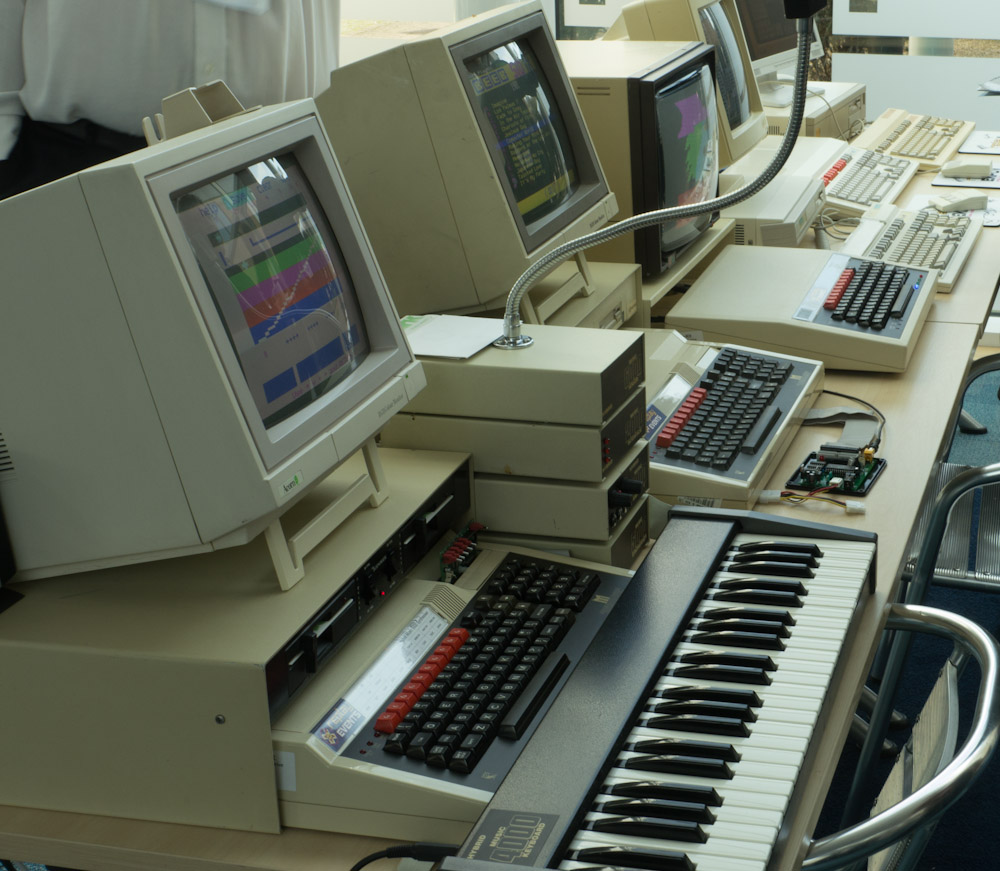
Domesday ProjectThere was a great opportunity in Cambridge today for techies of a certain age to get all nostalgic about a machine which, for many of us, changed our lives, at the 30th anniversary party for the BBC Micro.

Organised by Jason Fitzpatrick's soon-to-be-Cambridge-based Centre for Computing History, with the assistance of ARM, Redgate and several others, this brought together most of the original team, and many of the original machines and peripherals, that we remembered so well.

There was much discussion about the legacy of the project, and my friend Eben Upton gave an inspiring talk about the aims of the Raspberry Pi team, which many hope will be the BBC Micro for the next generation.

One thing that occurred to me during the presentations was that the original BBC Model B sold for £399, or approximately £1200 in today's money. (That's about the price of a MacBook Pro now.) The investment that my parents were making in my future was not the cost of a Raspberry Pi. It was the cost of about 40 Raspberry Pis - a whole classroom-full. Eben, significantly, pointed out in his talk that they hoped it wouldn't really be schools or parents who would buy most of these. It would be the children themselves. And I think that's important.

Beeb peripheralsNow, progress always depends on building new layers of technology on the platforms provided by the past. When I was young, the transition in play was from a world in which we bought electronic components to one in which we bought computers. Sinclair and Acorn made that transition accessible to kids. But computers are now a commodity, and you can argue that what's really important for kids to learn is the different ways of connecting them together in the real world. So my hope is that initiatives like Raspberry Pi will allow kids not just to own a computer, but to own a network. To learn about how networks work, to invent new ways of making use of them. Yesterday's solder track is today's ethernet cable. Yesterday's 6502 assembly language is today's IPv6 routing table.

And if we believe that there's any mileage in the internet-of-things/automated-home ideas, then perhaps the equivalent investment that today's parents might make could be, say, a 'connected room' kit, which allowed kids to give a URL to each lightbulb, each plug socket, each radiator valve, each loudspeaker, and the door. And then see how they link those together, and to their Facebook account, and to the Xbox, and so forth. Turn the music on when you turn on the light. Turn the heat down when you go to bed. Turn the lights down when you turn on the TV. It's a Lego kit that lets you play with the living spaces of the future, and perhaps monitor your carbon footprint at the same time.

Maybe... I don't know. There may be better ideas. This sounds fun to me, though! It could teach you a lot about networking.

And it could still cost much less than the original BBC Micro did.

Venn shall we ten meet again?

One of my dubious claims to fame is that I believe that in my youth I may have created the world's first ten-set Venn diagram.

Not single-handedly, of course. As with most of my endeavours, there were a few convenient giants' shoulders in the vicinity.

Here's the story, if you'd like to know more.


Alright, Mr. DeMille, I'm ready for my close-up.

OpenCV is a wonderfully full-featured computer vision library. I've just written a very simple demo of the built-in face recogniser. It finds a face and scales it to a fixed size. If you watch my eyes in the viewfinder window, you'll see they stay pretty much in the same place however I move around the room.

All sorts of things could be done to improve the frame-rate if needed, but this was just a quick test I put together over a couple of hours while learning about the library. Back in ancient history, when I did my PhD, this kind of thing would have taken weeks... The title of this post, if you're not familiar with it, is from the famous closing scene of Sunset Boulevard, which you can see here. Of course, as soon as I thought of using this title, I realised that I could also grant Gloria Swanson's greatest wish. So here's my version...

It needs some smoothing, but still quite fun.

Duplicate mail messages

In my various shufflings, copyings, archivings of email messages between my IMAP folders, I often end up with duplicates.

Sometimes, a copy or move goes badly wrong and I end up with hundreds of duplicates.

Many years ago I wrote a bit of Java code which would find and remove duplicates, but I've now converted it to a Python script and released it as Open Source, in case it's useful to anyone else.

You can find IMAPdedup here.

Feedback and improvements welcome!

Xauth Overload

The Story Of X:

  • In the beginning was xauth, a command-line utility that let you set which machines and users had authority to connect to your X windows display.
  • Then there was XAUTH, part of the authentication mechanism in IPSec secure connections.
  • xAuth, on the other hand, is variation on the OAuth protocol. It's being proposed by Twitter as a more convenient way for apps to authenticate with online services.
  • And now we have XAuth, a platform developed by Meebo to allow one website to see which other online services you might be logged into.
Come on guys! It's time to start using some other letters! Otherwise, we'll have to think of a way of pronouncing the different capitalisations, so that when geeks say to each other over coffee, "Why don't we just use x-auth?", they don't then all go and implement incompatible things...