Category: Programming

The code of law

Quote of the day:

"A good programmer is someone who always looks both ways before crossing a one-way street."

-- Doug Linder


It was only after marrying a lawyer that I realised something which had never before occurred to me: practising law can be very similar to programming computers.  

In both cases, you are trying to create a framework in which something can be achieved, while thinking of all the edge cases: all the ways it could go wrong; all the ways humans or other systems might be unpredictable, malicious or foolish, and catering for those situations as well as the ones you would normally expect to happen.

A good lawyer, like a good programmer, is someone who can expect the unexpected, and prepare for it.  A really good one can also make their plan both brief and readable.

And to any other software professionals who occasionally have to read tedious legal documents, I recommend thinking of them (and their creators) in this way, and you'll probably find them rather more interesting!


The success of Django... and when the machines take over.

The Django web framework is now 20 years old. Within a few months of its launch, I discovered it, liked it, and we rather daringly decided to bet on it as the basis for the software of my new startup. (Here's my post from almost exactly 20 years ago, explaining the decision.)

For those not familiar with them, web frameworks like this give you a whole lot of functionality that you need when you want to use your favourite programming language to build web sites and web services. They help you receive HTTP requests, decide what to do based on the URLs, look things up in databases, produce web pages from templates, return the resulting pages in a timely fashion, and a whole lot more besides. You still have to write the code, but you get a lot of lego bricks of the right shape to make it very much easier, and there are a lot of documented conventions about how to go about it so you don't have to learn, the hard way, the lessons that lots of others had to learn in the past!

Anyway, I had made a similar lucky bet in 1991 when the first version of the Python programming language was released, and I loved it, and was using it just a few weeks later (and have been ever since).

Django was a web framework based on Python, and it has gone on to be a huge success partly because it used Python; partly because of the great design and documentation build by its original founders; partly because of the early support it received from their employer, the Kansas newspaper Lawrence Journal-World, who had the foresight to release it as Open Source; and partly because of the non-profit Django Software Foundation which was later created to look after it.

Over the last two decades Django has gone on to power vast numbers of websites around the world, including some big names like Instagram. And I still enjoy using it after all that time, and have often earned my living from doing so, so my thanks go out to all who have contributed to making it the success story that it is!

Anyway, on a podcast this week of a 20th-birthday panel discussion with Django's creators, there was an amusing and poignant story from Adrian Holovaty, which explains the second part of the title of this post.

Adrian now runs a company called Soundslice (which also looks rather cool, BTW). And Soundslice recently had a problem: ChatGPT was asserting that their product had a feature which it didn't in fact have. (No surprises there!) They were getting lots of users signing up and then being disappointed. Adrian says:

"And it was happening, like, dozens of times per day. And so we had this inbound set of users who had a wrong expectation. So we ended up just writing the feature to appease the ChatGPT gods, which I think is the first time, at least to my knowledge, of product decisions being influenced by misinformation from LLMs."

Note this. Remember this day. It was quicker for them to implement the world as reported by ChatGPT than it was to fix the misinformation that ChatGPT was propagating.

Oh yes.

A work of art is never finished

"A work of art", so the saying goes, "is never finished, merely abandoned."

This assertion rings true in many artistic spheres, to the extent that I've seen variations attributed to people as diverse as Leonardo da Vinci and W.H.Auden.
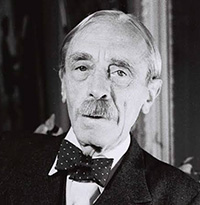
Paul ValeryThe site 'Quote Investigator' suggests that it actually originated in a 1933 essay by the poet Paul Valéry:

Aux yeux de ces amateurs d'inquiétude et de perfection, un ouvrage n'est jamais achevé, – mot qui pour eux n'a aucun sens, – mais abandonné ...

 and they offer this approximate translation:

In the eyes of those who anxiously seek perfection, a work is never truly completed—a word that for them has no sense—but abandoned ...

My knowledge of French idiom falls short of telling me how significant Valéry's use of the word 'amateur' is, though. Is he saying that it's the professionals who really know when a work is complete?

~

Anyway, the same original core assertion is sometime used when speaking of software: that it's never finished, only abandoned.

It's rare that any programmer deems his code to be complete and bug-free, which is why Donald Knuth got such attention and respect when he offered cheques to anyone finding bugs in his TeX typesetting system (released initially in the late 70s, and still widely-used today).  The value of the cheques was not large... they started at $2.56, which is 2^8 cents, but the value would double each year as long as errors were still found. That takes some confidence!  

He was building on the model he'd employed earlier for his books, most notably his epic work, The Art of Computer Programming. Any errors found would be corrected in the next edition. It's a very good way to get diligent proofreaders.

Being Donald Knuth does give you some advantages when employing such a scheme, though, which others might want to consider before trying it themselves: first, there are likely to be very few errors to begin with.  And second, actually receiving one of these cheques became a badge of honour, to the extent that many recipients framed them and put them on the wall, rather than actually cashing them!

For the rest of us, though, there's that old distinction between hardware and software:

Hardware eventually fails.  Software eventually works.

~

I was thinking of all this after coming across a short but pleasing article by Jose Gilgado: The Beauty of Finished Software.  He gives the example of WordStar 4, which, for younger readers, was released in the early 80s.  It came before WordPerfect, which came before Microsoft Word.  Older readers like me can still remember some of the keystrokes.  Anyway, the author George R.R. Martin, who apparently wrote the books on which Game of Thrones is based, still uses it.

Excerpt from the article:

Why would someone use such an old piece of software to write over 5,000 pages? I love how he puts it:

"It does everything I want a word processing program to do and it doesn't do anything else. I don't want any help. I hate some of these modern systems where you type up a lowercase letter and it becomes a capital. I don't want a capital, if I'd wanted a capital, I would have typed the capital."

-- George R.R. Martin

This program embodies the concept of finished software — a software you can use forever with no unneeded changes.

Finished software is software that's not expected to change, and that's a feature! You can rely on it to do some real work.

Once you get used to the software, once the software works for you, you don't need to learn anything new; the interface will exactly be the same, and all your files will stay relevant. No migrations, no new payments, no new changes.


I'm not sure that WordStar was ever 'finished' , in the sense that version 4 was followed by several later versions, but these were the days when you bought software in a box that you put on a shelf after installing it from the included floppies.  You didn't expect it to receive any further updates over-the-air.  It had to be good enough to fulfill its purpose at the time of release, and do so for a considerable period.

Publishing an update was an expensive process back then, and we often think that the ease which we can do so now is a sign of progress.  I wonder...

Do read the rest of the post.
Artificial History?

Here are some lovely examples of what can be achieved with a combination of technological prowess and human patience. Denis Shiryaev takes old, noisy, shaky black and white videos, and adds stabilisation, resolution enhancement, facial feature enhancement and some light colourisation. Then he adds sound. This is far from a fully-automatic process: he takes weeks over each one, but without the help of neural networks, it would take months or years if it were even possible.

Here's a collection of old Lumière Brothers' films that have had his treatment. Even though, by modern YouTube standards, almost nothing happens in them, I found them surprisingly compelling, yet also calming.

Oh, and this, though less convincing, is also fun:

More information on his YouTube channel and at his new company site.

The Modern Lab Notebook

I've just uploaded my longest YouTube video yet!

Entitled The Modern Lab Notebook: Scientific computing with Jupyter and Python, it's a two-and-a-quarter hour blockbuster! But you can think of it as three or four tutorial seminars rolled into one: no need to watch it in one sitting, and no need to watch it all! It starts with the basics, and builds up from there.

It's intended for people who have some Python programming experience, but know little about the libraries that have become so popular recently in numerical analysis and data science. Or for people who may even have used them — pasted some code into a Jupyter notebook as part of a college exercise, say — but not really understood what was going on behind the scenes.

This is for you. I hope you find it useful!

Watch it full-screen, and turn the resolution up :-)

Also available on Vimeo.

A healthy glow

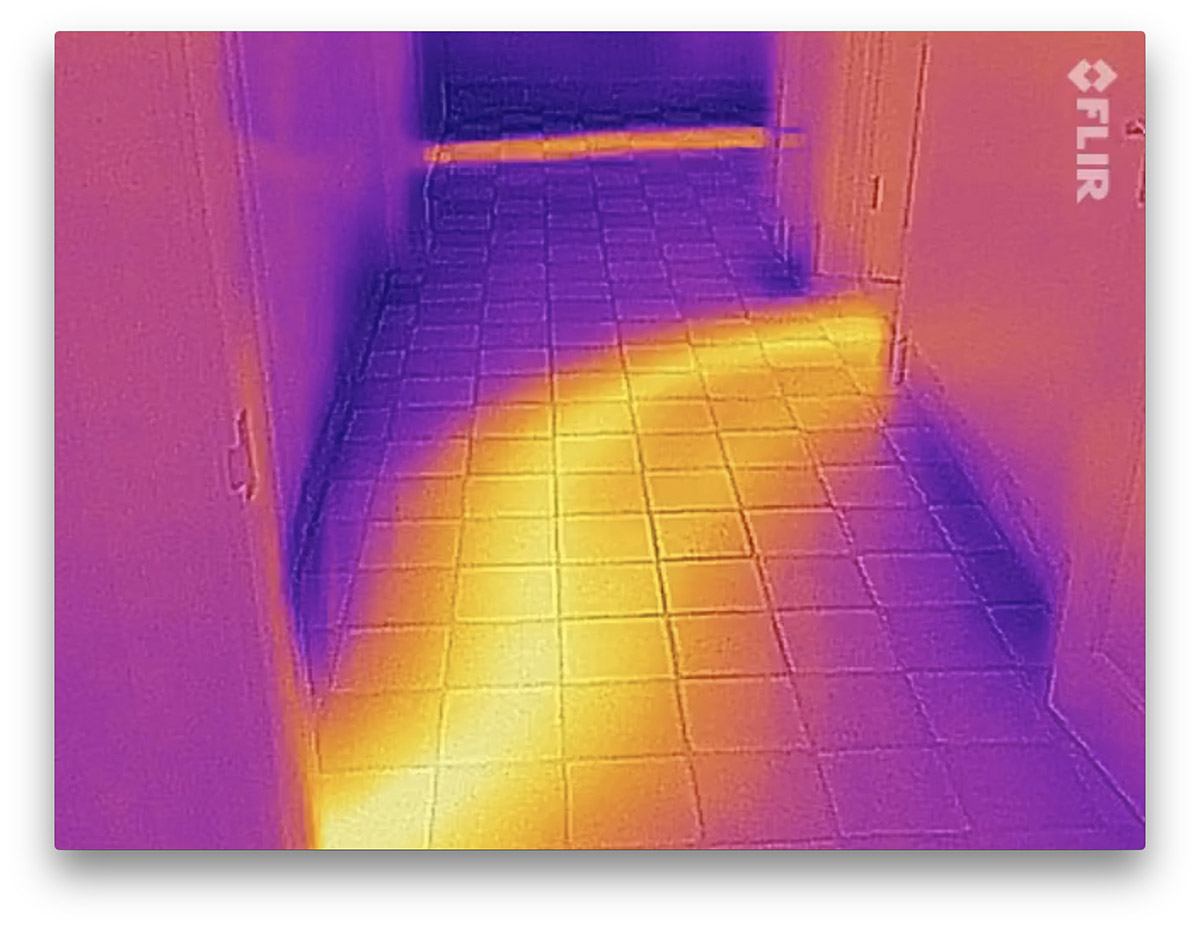
Here's a little video selfie of me breathing. Pretty exciting stuff, eh? The reason I look so strange is that it's taken with a thermal camera: the white and yellow areas are warm, the blue and black ones colder. I haven't decided whether or not it's an improvement on my normal appearance.

One reason for our interest in this at the Lab is that you can clearly see my nostrils getting cooler as I breathe in, and warmer as I breathe out. So a thermal camera is a pretty straightforward way for a computer to measure my breathing rate.

But I had some fun playing with the camera at home, too. Pointing it at my hall floor showed glowing tracks where the hot pipes run under the tiles, allowing me to see how the radiators in different rooms are connected up.

When I was looking around upstairs, I noticed some light patches on the floor and wondered what they were. It took me a moment to realise that Tilly had trotted up behind me to see what I was doing, and had silently departed, leaving only warm paw-prints behind her as evidence.

Retro Space Invaders

I think this is wonderful. Today I got to play with Gareth Bailey's Space Invaders game - a quick hack, he claims, which he put together yesterday.

This uses an oscilloscope as an X-Y plotter to draw the graphics, harking back to the earliest days of computer displays. But historically, displays like this would usually have been driven by a mainframe, where as Gareth's is driven by a Raspberry Pi.

And where do you get a couple of nice analog outputs from a Raspberry Pi? Why, from the left and right channels of the audio, of course....

Apologies for the quality of the video, but I thought this was worth capturing despite the challenging environment!

Old News

A couple of days ago, I received some suggestions for improvements to a program I had written. This isn't unusual: I'm writing code all the time, and much of it needs improving. (Thanks, Sam!) No, the surprise in this case was that the suggested changes were to a little script called newslist.py that I wrote in 1994 and haven't updated since. It wasn't very important or impressive, but seeing it again made me a bit nostalgic, because it was very much an artefact of its time.

For a couple of years, I had been playing with early versions of a new programming language called Python (still at version 0.9 when first I fell in love with it). In those days, online discussions about things like new languages occurred on forums called Usenet newsgroups. (As an aside, I was also playing with a new operating system called Linux, which Linus Torvalds had announced on the comp.os.minix newsgroup with one of those throwaway phrases that have gone down in history: ""I'm doing a (free) operating system — just a hobby, won't be big and professional..."".)

Anyway, the Usenet group archives are still accessible now through web servers like Google Groups, but the usual way to read them back then was to fire up a news-reading program and point it at a local news server, which could serve up the messages to you using the 'network news transfer protocol' NNTP. Since you wouldn't necessarily have a fast connection to anywhere else in the world from your desktop, organisations such as universities and the more enlightened companies would run their own NNTP servers and arrange with their pals in other organisations to synchronise everything gradually in the background (or, at least, to synchronise the newsgroups they thought would be of local interest). When a user posted a new message, it would trickle out to most of the servers around the world, typically over the next few hours.

But another novelty was catching my attention at that time... This thing called the World Wide Web. Early web browsers generally spoke enough NNTP to be able to display a message (and maybe even the list of messages in a group), so you could include 'news://' URLs in your web pages to refer to Usenet content. But a browser wasn't much good for more general news perusal because it didn't have a way to find out which newsgroups were available on your local server. My newslist.py script was designed to fill that gap by connecting to the server, getting the list of its groups, and creating a web page with links to them displayed in a nice hierarchical structure. You could then dispense with your special newsgroup app, at least for the purposes of reading.

When version 1.1 of Python was released, Guido van Rossum added a Demo directory with some examples of things you could do with the language, and newslist.py was included. And there it remained for a couple of decades, until, I discover, it was removed in 2.7.9 because the comment I had casually included at the top about it being free ""for non-commercial use"" no longer quite fit with the current Python licensing scheme. (I would happily have changed that, had I known, but I wouldn't have imagined anybody was still using it!) The Demo directory itself was dropped in Python 3, and so newslist.py was consigned to the historical archives.

So you can understand my surprise at discovering that somebody was still experimenting with it now! I didn't know anybody had an NNTP server any more.

What's almost more surprising is that one of my two email addresses, mentioned in the code, is still working 23 years later, so he was able to write and tell me!

All of which tells me I should probably pay more attention to what I put in the comments at the top of my code in future...