Category: Linux

Speed up slow console in VirtualBox

This is one of those geeky posts that is here for the benefit of (a) my failing memory - so I can search for it later - and for (b) anyone who happens to Google for the right keywords.

At Camvine, most of our development is done on Linux, but many of us have Macs as our preferred desktop machines. So we regularly install Ubuntu Linux Server as a virtual machine using VirtualBox. We're not interested in a graphical interface to the VM - the console is fine. Unfortunately, the default video driver that Ubuntu uses when running under VirtualBox is painfully slow, to the extent that we usually minimize the window and SSH into the machine.

Fortunately, the guys on this thread found a solution - thanks everyone!

On the VM, edit /etc/modprobe.d/blacklist-framebuffer.conf and add a line: blacklist vga16fb

Reboot the VM and speedy scrolling should be yours again.

(Of course, you may still want to ssh in to get more convenient cut & paste, etc., but it's nice to have a speedy console anyway, and you may not always have network access to the VM.)

Flushing your DNS cache

OK - a really geeky little tutorial, this one. If you've never felt the urge to flush your DNS cache, then don't worry, that's quite normal, many people live long and happy lives without ever doing so, and you should feel free to ignore this post and go about your other business.

A little bit of background...

DNS lookups, as many of my readers will be aware, are cached. The whole DNS system would crumble and fall if, whenever your PC needed to look up statusq.org, say, it had to go back to the domain's name server to discover that the name corresponded to the IP address 74.55.156.82. It would need to do before it could even start to get anything from the server, so every connection would also be painfully slow. To avoid this, the information, once you've asked for it the first time, is probably cached by your browser, and your machine, and, if you're at work, your company's DNS server, and their ISP's DNS server... and it's only if none of those know the answer that it will go back to the statusq.org domain's official name server - GoDaddy, in this case - to find out what's what.

Of course, all machines need to do that from time to time, anyway, because the information may change and their copy may be out of date. Each entry in the DNS system therefore can be given a TTL - a 'Time To Live' - which is guidance on how frequently the cached information should be flushed away and re-fetched from the source.

On Godaddy, this defaults to one hour - really rather a short period, and since they're the largest DNS registrar, this probably causes a lot of unnecessary traffic on the net as a whole. If you're confident that your server is going to stay on the same IP address for a good long time, you should set your TTLs to something more substantial - perhaps a day, or even a week. This will help to distribute the load on the network, reduce the likelihood of failed connections, and, on average, speed up interactions with your server. The reason people don't regularly set their TTL to something long is that, when you do need to change the mapping, perhaps because your server has died and you've had to move to a new machine, the old values may hang around in everybody's caches for quite a while, and that can be a nuisance.

It's useful to think about this when making DNS changes, because you, at least, will want to check fairly swiftly that the new values work OK. There's nothing worse than making a typo in the IP address of an entry with a long TTL, and having all of your customers going to somebody else's site for a week.

So, if you know you're going to be making changes in the near future, shorten the TTL on your entries a few days in advance. Machines picking up the old value will then know to treat it as more temporary. You can lengthen the TTLs again once you know everything is happy.

Secondly, just before you make the change, try to avoid using the old address, for example by pointing your browser at it. This goes for new domains, too - the domain provider will probably set the DNS entry to point at some temporary page initially - and if you try out your shiny new domain name immediately, you'll then have to wait a couple of hours before you can access your real server that way. Make the DNS change immediately, before your machine has ever looked it up and so put it in it cache and any intervening ones.

Finally, once you've made a change, you may be able to encourage your machines to use the new value more quickly by flushing their local caches. This won't help so much if they are retrieving it via an ISP's caching proxy, for example, but it's worth a try.

Here's how you can use the command line to flush the cache on a few different platforms. Please feel free to add any others in the comments:

On recent versions of Mac OS X: sudo dscacheutil -flushcache

On older versions of OS X: sudo lookupd -flushcache

On Windows: ipconfig /flushdns

On Linux, if your machine is running the ncsd daemon: sudo /etc/rc.d/init.d/nscd restart

If you're actually running a DNS server, for example for your organisation's local network:

On Linux running bind9: rndc flush

On Linux running bind8: ndc flush

On Ubuntu/Debian running named: /etc/init.d/named restart
Duplicate mail messages

In my various shufflings, copyings, archivings of email messages between my IMAP folders, I often end up with duplicates.

Sometimes, a copy or move goes badly wrong and I end up with hundreds of duplicates.

Many years ago I wrote a bit of Java code which would find and remove duplicates, but I've now converted it to a Python script and released it as Open Source, in case it's useful to anyone else.

You can find IMAPdedup here.

Feedback and improvements welcome!

ServerBar

serverbarMichael has made his rather nice ServerBar utility available.

If you have a Mac and you manage Unix-type machines (including other Macs, of course), this might be for you. It only really does one thing, but it does it well - it shows you the load on your remote machines - and it gives you a convenient shortcut (by clicking on the graph) to a terminal on any machine. If you know what SSH is, this might be of interest.

Recommended.

VNC2DL

vnc2dl2Warning - for geeks only...

I've just posted an alpha version of VNC2DL on github.

This is a VNC viewer which uses the new Open Source library from DisplayLink to display a VNC session on a USB-connected display, rather than in a window.

Just in case it's useful to anyone...

imPresto

"I would show you this on my laptop", said a visitor to our company recently, "but it would take forever to boot up".

And I realised how long I'd been living in a Mac world: for the last eight or nine years I've had a laptop where you open the lid and start typing pretty much immediately. (Camvine is an all-Mac shop except for the servers, which are Linux, and stay on all the time anyway.)

The slow start-up (and even rather painful resume-from-suspend) that people in the Windows world often experience has led to some modern machines having a minimal Linux installed alongside Windows, so you don't have to wait for your entire world to load if you just want to check something quick on the web. Chris Nuttall, writing in the FT techblog, seems to be quite impressed with Presto.

Drop it in the box

I've only just started playing with Dropbox, but it looks very cool.

It's what iDisk should have been. Software for Windows, Linux and Mac will create a Dropbox folder on your machine. Anything you drop on that folder is efficiently and securely synchronised to all other machines connected to the same account. It keeps past versions of updated files for you. The storage behind the scenes is Amazon's S3 service. And if you're using less than 2GB, Dropbox is free.

Here's a more detailed write-up by Ryan Paul.

Some Linux backup utilities

For some years I've been backing up my various Linux-based servers, websites etc using a custom script which makes incremental tar-based backups of key directory hierarchies, dumps some MySQL databases, and then copies the lot to a remote machine using scp or rsync. We run this each night using cron. It's worked well, but it's becoming rather spaghetti-like since we run some version of it on several machines, copying stuff to several other machines. And the process of pruning old backups to keep disk usage under control at both the sources and the destinations is somewhat haphazard.

So I've been looking at various other backup systems which may do a more manageable job. The big systems in the Unix world are the venerable Amanda and the more recent but highly-respected Bacula. I may do something based around Bacula in due course, but for now I needed something quick. Here's a quick rundown of some useful backing-up scripts. They all make use of rsync, or the rsync algorithm, in some way, but do more than just copy from A to B.

rdiff-backup
You can think of this as an rsync which keeps some history. The destination ends up with a copy of the source but also has a subdirectory containing reverse-diffs so you can get back to earlier versions. This is rather nice, I think, and it can pull the backups from or push them to a remote machine, though it does need to be installed at both ends. It's mostly Python and relies on librsync. The standard Ubuntu rdiff-backup package isn't very recent so I built and installed it by hand.
duplicity
This looks good and is being actively maintained. It's a bit like rdiff-backup but focuses on encryption, and uses incremental tar-based backups. For me, the downside was that it's push-only - you run it on one machine to send backups to another - and I was more keen on pulling from several machines under centralised control. Update: I later discovered that pushing can have some real advantages. One is that it can often be easier to manage the permissions of the backup user on the machine where the data exists. It might be a cron job run as root, for example. Another is that you may not always be able to install software or cron jobs on the machine where you want to store the backups. Also, duplicity has some interesting backends for things like Amazon S3. I'm using duplicity more now than when I first wrote this.
rsnapshot
In the short term, I think this is the one that will suit me best. You can create categories like 'hourly', 'daily', 'monthly', and specify how many of each you'd like kept. It creates complete copy directories for each copy of each one, but where the files haven't changed they are simply hard links to the previous ones, so it's pretty efficient on space. And a single configuration file can perform lots of remote and local backups. I suppose the downside is that the hard-link based architecture limits the range of filesystems on which you can store your backups, but if you're firmly in the Unix world this seems to work rather well.
Just in case anyone else is looking... Update: Emanuel Carnevale reminded me about:
Unison
Unison is a bit like rsync but does bi-directional synchronisation - it can cope with changes being made at either end. I hadn't really thought of it as a backup tool, but - perhaps because two-way synchronisation can sometimes do unexpected things - it does have the ability to keep backups of any files it replaces. One more option if you need it...!

Falling markets

My first computer, a Sinclair ZX81, cost £69.95. Since then, every computer I’ve owned has cost more – usually substantially more. Until today.

Today I bought a new laptop for £179 inc. VAT, which in real terms is less than my ZX81 of 27 years ago. Progress at last! And this one I didn’t have to plug into a cassette deck and an elderly black-and-white TV!

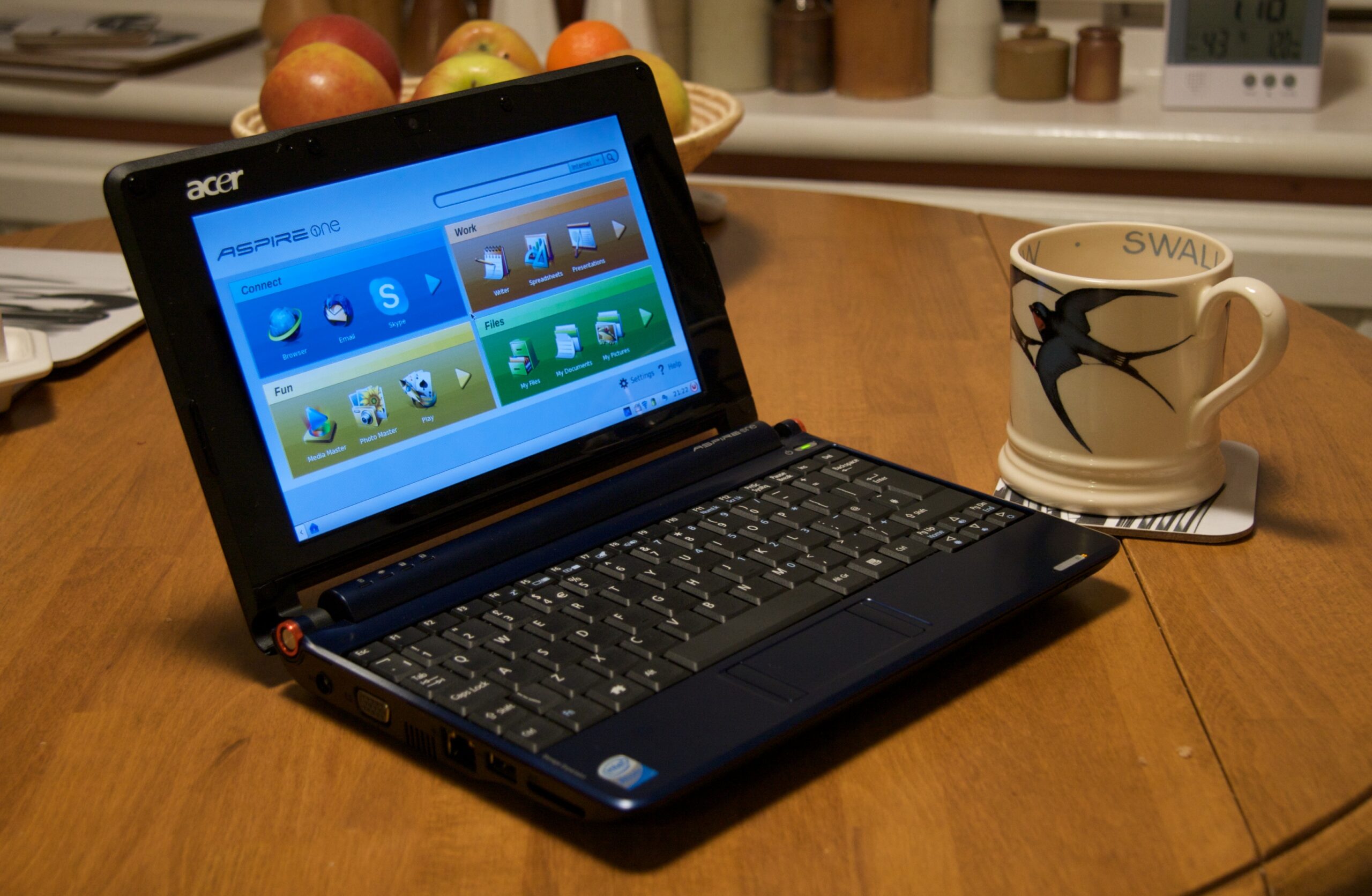
It’s an Acer Aspire One, and I have to say that, so far, I’m really impressed. It runs OpenOffice, Firefox, Thunderbird and Skype very nicely, and it includes a few things like a camera and microphone that work remarkably well – I’ve just had a video-Skype call with my pal Jason while walking around the house.

2008-10-24_20-25-16

Of course, it has some limitations – it boots up very much faster than any Windows machine I’ve ever seen but it’s not like a Mac’s almost instantaneous wake-up from sleep. I couldn’t write this post on it but only because it can’t read the RAW-format images from my SLR, and I couldn’t watch movie trailers on the Apple site because you can’t get Quicktime for Linux. But the number of things it can do rather well are remarkable, and I could happily survive with it for a weekend when I didn’t want to carry anything heavier, or use it to catch up on news at the breakfast table.

It may not be a Mac, but it’s certainly not a ZX81!

Ubuntu Netboot installation

If you have an existing Linux machine (already running GRUB) and you want to install a fresh version of Ubuntu on it, this page may be handy. All you need to do is download a kernel and an initrd file, reboot and issue a couple of GRUB command lines, and you can install everything else over the network from the Ubuntu repositories.

I've just got a new hosted server which came with 6.06 installed, and I wanted to wipe it and start with a clean 8.04. This was a very quick and easy way to do it, especially since I didn't have easy access to the machine's CD/DVD drive.