Category: Internet

Future-proofing my blog

Well, IPv6 has now been officially launched on the world, and this is a quick note to let you networking geeks know that Status-Q is now IPv6-enabled. You may be connecting that way already, and in theory you shouldn't be able to tell, because www.statusq.org has both an IPv4 and IPv6 address and your browser will use whichever one it prefers. I'm going to write a bit more about IPv6 soon.

But if you want to check whether you have IPv6 connectivity to here, you can try going to

which is an IPv6-only address. It probably won't work yet for most of you. UK ISPs are being a bit slow on the uptake and, to be fair, with some reason: it's a big change. So if you want to get IPv6 connectivity at home you may need to jump through quite a few technical hoops (and I'll write soon about how I did it). But they'll have to support it eventually, and most modern operating systems handle IPv6 out-of-the-box and have done for some time, so once the connectivity is there, everything just works. A very handy site, if you're playing with this is which will tell you what your connection and browser can do. More on this topic soon.

Reach for the Skypes

I love Skype - it's one of the most-used utilities on my Mac, and a vital business tool.

There are some who don't understand this, chiefly because they think Skype is about making cheap phone calls. Of course, it's very good at that too: I dread to think how much I might have clocked up in phone bills on my last holiday if I hadn't had Skype and the hotel wifi network. It's also the easiest way I know to set up conference calls.

But mine is configured so that when I double-click on a name, it pops up a chat window, not an audio connection. Though, I admit, the first thing I type is often 'Are you free for a quick call?' But that's so much more polite and... well, British... than simply bursting a ringing phone into someone's day without so much as a 'by your leave'.

At other times, the chat window is all I want. I can drop quick text messages in there, like 'Can you remind me of the login for this URL?', and it's generally quicker and less hassle for everyone involved than any other way of transferring that information.

The real power comes when you're combining the two - a conversation and a chat window. If you've ever tried dictating a URL to someone so that you can peruse a web page together while talking on the phone, you'll appreciate the power of a cut, paste and click to keep things moving along. And, gosh, I haven't started talking about video calls, about screen-sharing, about file transfer... And the fact that, if you're willing to pay a few pence, you can send text messages from it, which is so much easier than typing on a phone keyboard.

Anyway, the degree to which you too will discover this brave new world of communicative wonderfulness depends on two things:

  • How many of your friends know your Skype address (so put it in your email signatures)
  • Whether you run it most of the time (so set it to start up when you log in)
Skype first became really important for me when one of my former companies was headquartered in a house with a studio in the garden. Half of the team worked in the house, and half in the shed, so having a quick, lightweight method of communication between the two was important. When we outgrew that, we moved to an open-plan office. Open-plan offices are things that people used to think were a good idea because they hadn't tried them. Then commercial landlords realised that it was a much more convenient way to let out office space, so they told their clients, "Oh yes, everybody's doing this now". They still continue to exist because the people making the property decisions aren't writers or software developers, who need peace, quiet and concentration, punctuated by a modicum of social interaction over caffeine-dispensing equipment, to be really productive. So, in many offices, you have big open spaces filled with people wearing headphones and listening to music loud enough to drown out the distractions of the phone calls around them. They're more isolated than if they were in different rooms. Managers seem to like this arrangement, because when they walk in they see large numbers of people beavering away, and they fail to realise that those people are beavering about two-thirds as efficiently as they might beaver. Factor that into your rent-per-square-foot... Anyway, I digress, but the result was that Skype continued to be important when we were all in one room, not to talk to people at the far end of the garden, but for reaching those who were just a couple of desks away but in a completely different musical genre. If you spend much time sitting in front of a computer, you owe it to yourself to run Skype and get your friends and colleagues doing so too. Yes, there are other systems, but few that run on Windows, Linux, Mac, Android and iOS and give you such a variety of different communication styles. One final tip for Mac users: the current version of Skype, version five-point-something, is generally agreed to be horrible. Well, not horrible, exactly - in fact, I think it looks quite nice - but it does have ideas above its station and wants to take over your entire desktop. Fortunately, this feeling that it's got just a bit too big for its boots is so widespread that the previous version, 2.8, is still available from the Skype website on its own download page a couple of years after its supposed replacement was rolled out. Grab a copy and make a backup, in case it goes away...

Tenuously LinkedIn?

Someone I have never met, communicated with, or even heard of has just sent me a LinkedIn invitation:

XYX has indicated you are a Friend: Since you are a person I trust, I wanted to invite you to join my network on LinkedIn.
I guess he must just have a very positive view of mankind... It reminds me of Zaphod Beeblebrox:
"Who are you?" "A friend!" Shouted back the man. He ran toward Zaphod. "Oh yeah?" said Zaphod. "Anyone's friend in particular, or just generally well-disposed to people?"
Douglas Adams was a true visionary...

Multi-hop networking

Venice, as you may know, is made up of about 100 islands connected by lots of little bridges. That's roughly how the little network here in my Venice hotel room works, too.

The hotel charges for a wifi connection - only a one-off charge, but it is per-machine, so I only paid for my Macbook to be connected. With recent versions of OS X you can easily create a PAN (a 'Personal Area Network') using Bluetooth, so Rose's laptop and my iPad could then get access by using my Mac as a Bluetooth < -> Wifi gateway. All very cool.

However, I could not get my iPhone to connect that way. I don't know whether it should work or not - the general expectation is that you're more likely to use your phone to provide connectivity for your laptop than the other way around! But I wanted a connection for the phone because I needed to download maps and other reference materials to have in my pocket as we explored, and I didn't want to pay roaming data charges.

And then I realised that, just as my laptop was sharing its wifi connectivity to Rose's laptop using a Bluetooth PAN, so her machine could then share that connectivity as a wifi network again! And, hey presto, my phone had a network, so I can now download maps to my heart's content!

What else would one be doing in Venice, after all?...

:-)

Digital Archaeology: Ode to a Cantabrigian Urn

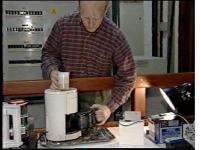
Tucked away on a backup disk yesterday, I discovered a few thousand of my emails from the 1990s. And in the folder from late Feb 1992, I found something I thought was lost forever. Bob Metcalfe was visiting Cambridge, on sabbatical to the University Computer Lab, just as we were setting up the Trojan Room Coffee Pot camera. He wrote about it in his column in Communications Week, a publication which, sadly, closed down not long afterwards (roughly at the time when the camera was connected to the web and became quite famous). This original article was therefore, unknowingly, the first published reference to what was to become the world's first webcam.
But I didn't have a copy, and nor did Bob - the old Mac floppy on which he saved it would have been hard to read now even if he could have found it - and if anyone kept an archive of CommWeek articles, I haven't found it on the web. (Few people in 1992 would have heard of the World Wide Web, even those reading this kind of technical article.) But, as it went to press, Bob sent me a copy by email, and, sure enough, just over 20 years later, there it was, easily readable by my Apple Mail program.

There's probably some useful lesson there about the longevity of different data formats... Anyway, while it may have little interest to anyone not closely involved with networking technologies at the time, I'm still very glad that, with Bob's kind permission, I can now make the article available here. And I must take more care of my email archives in future...

Dropbox Workflow

Here's a trivial but perhaps useful tip for those involved in remote collaboration...

I've been helping a client with some proof-reading recently, a process which involves a large number of small documents going through various stages of approval involving the client, their designer, and me.

We start with the PDF produced by the designer from the raw text, which I then proof-read and mark up, sometimes coming up with questions which need clarification from the client, and then the designer uses all of this to produce the final PDFs. We are all geographically separated, and often working at different times of day.

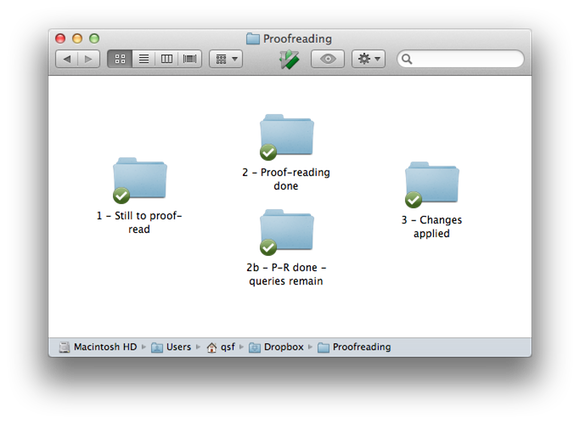
The designer in this case is Rick Lecoat at Shark Attack Design, who suggested a nice system to handle the workflow. He shared a folder on Dropbox, within which he'd created several numbered subfolders, something like this:

As the proofs became available, he would put them into the first folder. I'd mark them up and move them into one of the secondary ones, depending on whether I had any pending questions about them (which I'd add as comments in the PDF). If they ended up in '2b', the client could check my questions, and add appropriate responses, before moving the file into folder '2'. Lastly, the various comments would be taken into account by Rick and used to produce the final versions in the last folder. (Our actual workflow was slightly different, but you get the idea.)

I really like this system. It works even though some of us are on Windows, some on Macs, and I'm mostly working on my iPad. Computer scientists will recognise it as a simple 'state machine' but implemented in a way that non-computer scientists can easily understand! It's also trivial to modify on the fly. I could, for example, add a folder called '1b - Quentin currently checking', into which I could move a document when I started to proof-read it, if I wanted to make that stage more explicit. As long as the folder titles are sufficiently explanatory for their use to be clear, and a document is only moved and never copied, it all works very nicely.

The numbers help clarify the general flow, and also ensure that the folders are displayed in a sensible order when sorted alphabetically. You can lay out the icons in the folder to make it even more obvious (on the Mac at least - I don't know if Windows can do this now). As a variation, you could include in a folder's title the name of the person responsible for examining its contents, for example, or add a README file in the folder explaining its use and where things should go next. Dropbox keeps everything nicely in sync, can give you desktop notifications as things change, and, as long as one of you has a paid account, will keep backups of all the past versions of the documents as well.

Your workflow may be very different, but if it involves files and collaboration, you may find something along these lines useful. I once modified a bug-tracking system to handle the CVs and covering letters of incoming job-applicants, as they went through the various stages of interviewing, rejection, offers, acceptance etc. It worked well, but the admin staff needed to be taught how to use the web-based system. I think this might have been a better approach.

Thanks, Rick!

Wickedleaks?

Gosh, it's almost a year since the big WikiLeaks furore. Tempus does indeed fugit. At the time I wrote briefly about the similarities between WikiLeaks and print media.

John's Observer column today draws this out nicely with the help of Yochai Benkler's paper. Recommended.

What goes around comes around...

It's - wow! - almost twenty years since we set up the original Trojan Room coffee pot camera.

Now some cunning Danish developers have a demo of how you can monitor the level of your coffee using a Management Pack plugin for Microsoft System Center Operations Manager 2007, which is quite fun, and I imagine is even more useful if you've ever actually heard of Microsoft System Center Operations Manager 2007...

A cautionary eBay tale

My brother had an interesting experience recently: he was selling a PSP games console on eBay and had given it a 'Buy It Now' price. He got an email from eBay saying that it had been sold, and another from Paypal saying that the payment had arrived.

He also had a message from the UK purchaser, saying that they would be grateful if it could be shipped straight to his son a.s.a.p. as it was his birthday coming up. Could it go in the post the following morning? He had added a suitable sum to the payment to cover the extra shipping cost.

The machine was all boxed up and ready to go, but there was one aspect which made them hesitate just before taking it to the post office.

The delivery address was in Nigeria...

They went back and looked more carefully at the emails, which had looked entirely genuine, and found that they weren't quite the real thing. And when they went to the eBay account, sure enough, the item was marked as sold, but no payment had been received. Only the carefully-targeted emails made them think that the sale was completed.

They looked on Google and discovered that neither the address in the UK given by the purchaser, nor, it appeared, the one in Nigeria to which it was supposed to be delivered, seemed to exist. Presumably the perpetrator was planning to collect it from the post office or some similar scheme.

However, the interesting question is whether they (or I) would have fallen for the scam if it hadn't contained the word 'Nigeria'. If the supposed son had been in a remote country with a less tarnished online reputation - in Italy, or Egypt, or Poland, perhaps - they might now be kicking themselves...