Category: Apple

Macs and stuff

Clockwork Orange?

TangerineHere's a neat little free Mac app that's getting some attention: Tangerine.

It analyses the music in your iTunes library and works out the BPM (beats per minute) of each track. It's in beta at present, but works really quite well. There are multiple uses, but I guess the chief benefit will be for those who like to exercise to music and want to jog at a consistent speed!

I could use it to discover that the people running twice as fast as me are only doing so because they're listening to Hall & Oates' Maneater (179bpm) while I struggle along with Dylan's One More Night (89bpm).

Of course, if you're creating playlists of songs that blend into each other, you can juxtapose songs with a x2 speed multiple and they work rather well...

Perian

Mac users should check out the Perian project.

"Perian is a free plugin that enables QuickTime to play almost every popular video format."

A nice side-effect is that it also enables Front Row to play almost every popular video format. Like the ones that typically float around in Bittorrent space...

Mojopac on the Mac revisited

I wrote a few days ago about Mojopac, and whether we might get something similar on the Mac. Steven Talbott pointed me at this interesting patent that Apple was granted yesterday which covers, very approximately, keeping your home directory on an iPod and being able to log in to a machine using that account when you plug the iPod in.

Networked scanner and Mac OS X

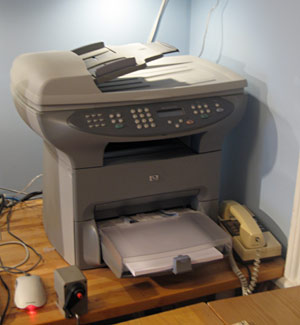
HP Officejet 3330In the corner of my home office, there sits an HP OfficeJet 3330. I'm rather fond of this beast - it has provided us with a copier, scanner, fax and laser printer (albeit b&w) at home for a very reasonable price, and has never given us any trouble. There's a JetDirect box stuck to the back so that it's on the network and we can print to it from any machine in the house.

As an aside - I never realised just how useful having a copier at home could be until I got one. Here's an example: I occasionally like going for longish walks around the Cambridgeshire countryside on Sunday afternoons. I used to stuff a guide book in one pocket and an Ordnance Survey map in another. Now, I just photocopy a couple of pages and the relevant bit of the map. Much easier to deal with in rain or a high wind...

Anyway - the HP software is laughably bad, but we normally only need the printer driver which works just fine. Occasionally, though, I need to scan things. I forget whether there was no HP Mac software which worked with networked scanners, or whether it was so bad that I abandoned it, but for years I've been using the web interface to do any scanning. Not very flexible or convenient, but it worked.

Today, however, Dave Hill showed me a much better way, albeit rather more complex to set up. Those who are unlikely to want to try this should probably move on to John's blog at this point!

Can you do this and keep sane?

Basically, you use the Open Source SANE project, which supports a wide range of scanners connected in a variety of ways, and you combine it with Mattias Ellert's excellent TWAIN SANE Interface for Mac OS X, which can make SANE-connected scanners appear as TWAIN devices - the standard that most programs expect when talking to scanners.

You can do this all on the Mac itself, though I followed Dave's setup and used a Linux machine to provide the SANE service, which then allowed software on the Linux machines as well as on the Macs to make use of the scanner. I won't go into full details here - you can find out more from the links above - but the basics for my system are:

  • The Linux machine connects to the OfficeJet over the network using the hpoj driver

    Install sane and saned on the Linux box. In the unlikely event that your Linux distribution doesn't include it or offer a convenient package to install it, you can try the SANE project site. Make sure that hpoj is listed in /etc/sane.d/dll.conf. If that's the only scanner you want to contact, you can comment out everything else. You'll need to do something to register your particular scanner device; on my Ubuntu machine this involved running /etc/init.d/hpoj setup and entering the IP address. The scanner should now be available to Linux software; try running scanimage -L and you should see it listed. The HPLIP project may provide an alternative to HPOJ if wanted.

  • The Linux machine shares it on the network using the SANE daemon saned.

    Edit /etc/sane.d/saned.conf and specify that machines on your network will be allowed to connect via SANE - the easiest way is just to put in a line containg a plus (+), which allows everybody. You need to make sure saned is running, typically by starting it from inetd as described in the man page for saned.

  • The Mac SANE backend is configured to connect to the Linux machine, where it can discover the shared scanners.

    Mattias has a page where you can download the SANE backend for the Mac and the TWAIN SANE interface as convenient packages. You need to edit dll.conf here as you did on the Linux box to tell the Mac where to look for scanners - of you're using Mattias's packages, it lives in /usr/local/etc. In this case the only line you need to have uncommented is 'net'. Edit net.conf and put in the name or IP address of your Linux box.

    You may also need to make sure that saned can be automatically run by editing /etc/services and /etc/inetd.conf, as you did on the Linux box..
  • The TWAIN SANE interface makes this available to Photoshop, Image Capture, Acrobat etc.
This sounds pretty convoluted, but it's not too hard, and it all works fine. You can also use the Linux box to share non-networked USB or parallel port scanners, and convert them into networked ones. If you want to do it all on the Mac without an intervening Linux machine, you'll need to find (or compile) a copy of the HPOJ driver for the Mac.

PocketMac update

If you're a Mac user and a Blackberry user, you might like to know that there's an update to the free PocketMac software which syncs the two. You can get it from the Blackberry.com site.

This is still far from perfect - in particular, it corrupted my Mac address book the first time I ran it, perhaps because the Blackberry went to sleep in the middle - I'm not sure. I strongly suggest you backup your Address Book and iCal before trying it for the first time - they both have easy backup options in their menus. I restored them, and did a one-way synchronisation, overwriting the Blackberry, which took a phenomenally long time.

Since then, it's been fine, if not speedy, and it has a lot of features not in the earlier version. Most important for me is the ability to have just a subset of your calendars on the Blackberry - vital if you subscribe to many calendars belonging to your friends and family.

Copying the copy-protection

Jon Lech Johansen, best known for breaking the encryption on DVDs so that Linux users could also watch them, is now creating encryption. Well, sort of...

He has reverse-engineered Apple's Fairplay and is starting to license it to companies who want their media to play on Apple's devices. Instead of breaking the DRM (something he's already done), Jon has replicated it...
(from GigaOM) This lets media-producers use Apple's DRM without having to talk to Apple. (Of course, it's worth remembering that Apple's system will also play non-DRMed material). It's not a long-term business strategy, I shouldn't think, because Apple owns the whole chain at the moment and so can change Fairplay to an incompatible system in future without affecting their users too much. That would, however, involve re-encoding the media that currently works, so it's probably something they wouldn't want to do...

A handy utility

Renamer4Mac Those of us who love the command line can be keen to point out its advantages over pure GUI-based programs. "Imagine you want to rename a hundred files", I have been known to say, "to change photo001.jpg to old_paris_photo001.jpg, etc..."

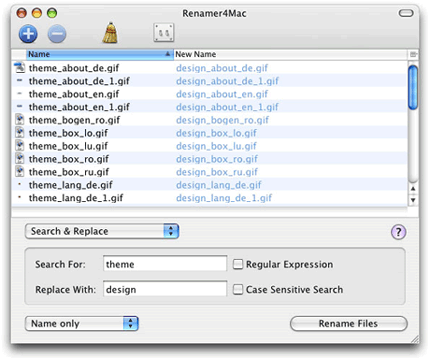
Now, the truth is that, while it would be a real pain to do this in the Finder, it isn't exactly trivial on the Unix command line either. Which is why I think there's a room for a utility dedicated to renaming, especially when it's free, and as nicely implemented as Renamer4Mac. You drop the files onto the window, choose from a variety of filename modifications, and it shows you what the new names will be - a big advantage. Then you just click the button and you're done.

Renamer screenshot

It can also install itself as a contextual menu plugin, so you can select files in the Finder, right-click on them, and choose "Rename with Renamer4Mac..."

Thanks to the MacBreak vidcast for the link.

Mojopac on the Mac?

There's a lot of interest in Mojopac at the moment - a piece of software which lets you carry a complete Windows environment around on an iPod or other storage device and use it - your entire Windows world, desktop, applications and all - on any XP PC you happen to plug it into, alongside the already-running OS. Here's a video of it in use.

Part of the interest is that nobody seems to know quite how it works underneath. There's a 'How it works' page on the website which really doesn't tell you how it works at all. Is it a full virtual machine? That seems the most obvious, and if so, they've done quite a nice job of getting it to run without an installer.

But I've seen comments to the effect that there isn't a copy of Windows in the Mojopac you carry around, which would suggest that it must be running the OS that's on the host machine. So is it making use of Windows' fast user-switching combined with some kind of chroot environment? The Windows registry tends not to be so easily switched around... Who knows...?

Anyway, I started wondering how easy this would be to do on a Mac. In one sense, Mac users have always had it easier because you can generally put applications anywhere and run them from anywhere. So if you keep your documents and your favourite apps on a portable drive you can plug it into any Mac and usually get a lot of work done. But it's not your own environment; you're running as somebody else unless you have a login on that machine, and things like your email configuration won't be there. If you DO have a login on the machine then you can also get it to use the portable drive as your home directory, and your environment will then be there when you login, perhaps using the fast user switching on the Mac.

Or you can reboot and use what, for me, has always been one of the most valuable aspects of the Mac: its ability to boot and run entirely off external drives. That's proved incredibly useful on a number of occasions, especially when my own machine has died and I've been able to borrow somebody else's, use my whole world as normal, be upa and running again in a few minutes, and return the system untouched to its owner at a later date.

None of these is quite the 'walk up to any machine' scenario that Mojopac are claiming, though.

It did occur to me that I might put a copy of Parallels Desktop on a drive, along with a virtual machine image, and simply plug in the drive and double-click the image, at least on Intel machines. But, understandably, Parallels is one of the few things that really does require an installation, so unless it's already present on the machine, this doesn't work either. And besides, wonderful though Parallels is, the one operating system you can't run under it is Mac OS X, so for the user experience would always be sub-optimal!

If my friends at XenSource have their way, virtualisation capabilities will soon be de rigueur on every OS; it'll be something you switch on, rather than having to install. Most new Linux distributions have some support for Xen out of the box, for example, and I'm experimenting with it under Fedora Core 5 on one of my web servers, which now appears to the outside world to be 5 machines. Very neat. It's going to be a while before Xen has anything like the ease of use of Mojopac or Parallels. We're only just getting to the point where you can probably install it without recompiling your kernel.

But if the XenSource strategy of getting their Open Source core ubiquitously deployed on all x86 machines succeeds, then it'll be much easier for people to create Mojopac-type systems in future. Until then, I take my hat off to the Mojopac guys, if it really works as advertised.

f1.5

Regular readers will know that I was hoping for some update to Apple's Aperture software to be announced today. And sure enough, Aperture 1.5 will be a free upgrade later this week, with lots of nice new features.

As always with Aperture, there are video tours and tutorials including one which shows you what's new in this version. (Here's a direct link to that movie.)

Skype video for Mac

Skype betaThere's now a 2.0 beta version of Skype for the Mac, which includes video chat.

Almost everybody I know is on AIM, so for regular IM chatting I use iChat, with the occasional audio or video link to other Mac users. But Skype has always been better at getting through firewalls than iChat, and this could make it a better video solution, especially if the quality is as good as iChat.