Category: Apple

Macs and stuff

Ex-books and eBooks

Two rambling thoughts this morning about ebooks.

Mmm... an aside, before I've even started: How should I capitalise or hyphenate e-book? Quentin's Law of Technological Pervasiveness says that a (non-proprietary) technology has been truly successful when it's no longer capitalised. There are those who insist that 'internet' should still be 'Internet' but I don't tend to bother, any more than I would talk about the Electricity Grid... now, where were we? Ah yes...

  1. Unlike their predecessors, e-books have no real reason to go out of print. This is encouraging if you're an author who has poured years of your life into a work and can now take comfort in the idea that it will always be accessible, even if only a few continue to read it.
  2. Many publishers have made downloadable versions of their books freely available, confident in the knowledge that most people, if they like more than a chapter or so, will splash out for the paper version because it's so much nicer than reading on screen. Will the advent of the iPad and similar, really rather nice, portable PDF viewers put an end to this practice?

Ihad a little iPad...

This post is here to tell you little more than:

  • I'm in Seattle
  • I have an iPad
  • It's lovely
  • I'm using it to write this post
Things that I've found particularly pleasing in the very brief time I've had it include the fact that the keyboard, in landscape mode, is very much better than I would have imagined: I've brought a Bluetooth keyboard over with me but I think I may not use it much. Rose's books are available on the iBooks store. And the Kindle app is already iPad enabled. Lots of fun but I'm jet lagged and need to go to bed. I'll try not to take it with me...

Coffee Table Computing

Coffee Table computing

Apple has created a new kind of device - the coffee-table computer. This is not to say that it isn't an incredibly valuable tool for day-to-day life, but some of the early apps which are appearing for the iPad are simply capitalising on the fact that it is just a beautiful medium for displaying content, in its full-screen, uncluttered simplicity.

The Elements is a perfect example (and yes, it does include Tom Lehrer's song), as is the Guardian Eyewitness app which is a glorious showcase of the paper's photographers' work. They're both examples of things that would previously have been attempted using large-format hardback books (which wouldn't have included music and video).

I have no doubt that there will be many more to come...

Unlock 02 iPhone

Now that's something I didn't know... O2 customers in the UK can request to have their iPhone unlocked. At any time. Which means that affordable use while roaming is presumably now possible using a local SIM, though those tend not to give you data as well... still, I'd rather settle for phone capabilities and data via wifi than for no phone at all...

Good stuff. Have filled in the form and will see what happens... it can take a couple of weeks, apparently.

Drive to live

I've been replacing the hard drive on my Mac Mini, the one that runs my TV. Mac Minis are not easy beasts to disassemble, and it's something which could be a fairly daunting process were it not for the wealth of information online from those who have walked this path before.

Fortunately, the disk which died had little on it that was of importance. All the past episodes of Frasier and Poirot are stored on a separate drive! But fixing it has still been time-consuming. It brought home once again the message that all hard disks die. In particular, as we strive for ever-smaller devices, the 2.5in 'laptop' drives are becoming ever more popular, and these die much more frequently than their larger counterparts. Many of them will last for 10 years. Some will turn up their little tootsies after 6 months. But they will all go in the end.

So look around your house or office and consider your backup strategies. The question to ask yourself is "What will I do when this machine dies and all the data goes away?"

Go on. Do it now, because it might happen this afternoon. Start with the machine you're using to read this post. And note the 'when'. If we are tempted to say if, as the old saying goes, we deceive ourselves, and the truth is not in us.

What will I do when this machine dies and all the data goes away?

Improving the RUI - the Road User Interface

The great thing about travelling, I've always thought, is that it makes you realise what you've always taken for granted at home. Do light switches go up or down to turn them on? Or do you press them in so that a timer can pop them out again when you're halfway up the stairs?

One thing I noticed when first visiting the States was how much text is used on road signs compared to here at home. We tend to assume that symbols are better and so will create some complicated series of hieroglyphics to indicate that the road narrows and then turns left, while an American sign would probably say "Road narrows then turns left".

Symbols do have an advantage if drivers are illiterate, dyslexic, or foreign. And they usually take less space. But they need to be used well. Here's a sign I pass regularly which, I find, takes some thought:
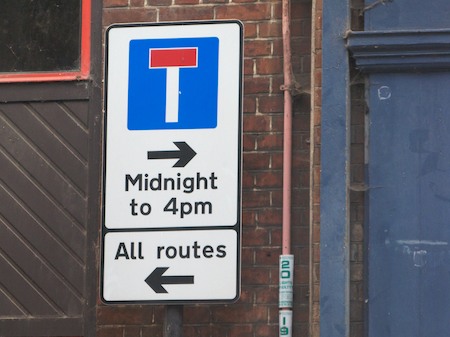
Cambridge road sign

It faces you as you come to a T-junction, so you at least have time to contemplate it, which is fortunate - it would be more challenging at speed!

For me, as I suspect for many people in this situation, the question I am asking is 'Can I turn right?'. To the right is a useful route that takes you away from the crowded centre of Cambridge where you've just been parked. But it is blocked, a little way down, by bollards which let traffic either in or out of town at different times of day. So what this sign says is that you can always turn right or left, but turning right will lead you to a dead end at certain times. Fine.

However, if you arrive just after lunch thinking, "Can I turn right?", you see the arrow pointing that way, you see the times, you work out whether you are in that midnight-to-4pm slot and then you think "Hurrah!", before realising that you've worked out the times when you're not allowed to do that.

I don't know, maybe it's just the way my brain works that's strange. Or maybe it was designed by some local logicians to keep people like me on their toes. I think it's a Microsoft road sign. Lots of different ways to do things and some of them unnecessarily complex.

How would Apple design this? I think the sign would just have a single elegant left arrow. They'd say, "Sorry, that's the only way you can go. No right-button clicks here. I know that seems restricting, but trust us, it's for your own good. And doesn't this sign look beautiful?"

iPhone/iTouch recommendations

A few of my favourite recent iPhone/iPod Touch applications - all very different - all recommended:

  • offmapsOffMaps is a map browser. It lets you do similar things to the built-in Google maps, but based on OpenStreetMap data (which is sometimes better, sometimes worse, but generally more up to date). However, the reason you might want to use OffMaps is that the Off stands for 'offline'. If you're like me, one of the main times you want maps of an area is when you are in another country where roaming data charges are extravagant. With OffMaps you can download the maps for an area in advance and use them when you have data roaming turned off - very handy.
  • glyderGlyder. I'm not much of a gamer, but I really enjoyed this, and played it through to the end. It's a lovely demo of the graphics capabilities of the platform, and a very nice use of the accelerometers as flight controls. Passed quite a lot of time very happily with this.
  • rightmoveRightMove is one of the biggest online estate agents in the UK, listing properties from very many sources. Their iPhone app is brilliant if you're in an area and think, 'I wonder how much it would cost me to move here?'. It can use your current location, and with one click list the properties for sale or rent near to you. You can enter an address as well, but that's not so cute! Very easy to use and very nicely done.
  • hereiamHereIAm is a simple utility for iPhone users trying to find other iPhone-owning friends. It gets your current location, shows you an estimate of how confidently it knows it, and pops up an email-composing window which includes a link to google maps pinpointing your position. Desktop users clicking the link will get a browser window, iPhone users will get the Maps app. It works fine on my tests and it's free... it would be nice to be able to preview the location before sending, though - something that should be possible in OS 3.0. But I guess you can just switch to the Maps app for that - it'll be the same location.
  • collinsdictNow, given that most iPhone apps cost a pound or two, it may seem ridiculous to pay £14.99 for one! It must be pretty revolutionary, right? No, it's a dictionary. A Collins French-English dictionary, in my case, though they have a variety of other languages available as well. So, yes, this does cost about the same as a nice hardback edition of the same dictionary, but it's really very good, much quicker to search, and much easier to carry in your pocket. If you look up 'frog', it will also give the translations for 'to have a frog in one's throat' and 'frogman'. It includes verb declensions, it auto-completes searches... well, anyway, I took a deep breath before buying it when going on holiday, and have absolutely no regrets.
The finger is mightier than the brush

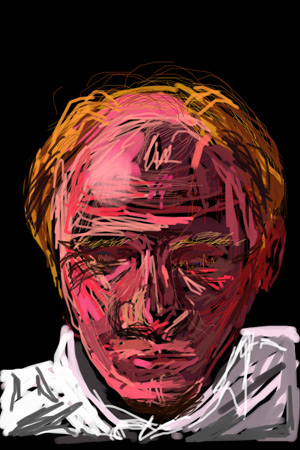
Quentin Stafford-Fraser by Simon FraserMy brother Simon is an artist. Well, he's a doctor, actually, but the two are not mutually exclusive, and he studied art up to A-level.
A couple of nights ago he and I were playing with the now-famous Brushes app on the iPhone/iTouch. I tried to draw a picture of him, he drew one of me. Suffice it to say that my one of him is not worthy to be reproduced even in this humble journal. His one of me, on the other hand, is really rather good. I am, of course, pictured looking down at my iPhone...

What particularly impresses me about this is that Simon had very limited experience with Brushes beforehand, and hadn't discovered that you could zoom in and out. So this is done almost entirely at 1:1 scale on an iTouch screen with a blunt finger.

It may not be too flattering, but I really like it. Perhaps it's appropriate that the first portrait anybody has created of me should have been drawn on an iPod.

Behind bars?

Overheard the other day: "How come your phone gets 5 bars here and mine only gets 3? We're on the same network!" It made me smile: as far as I know, there is no standard for the number of bars displayed vs. signal strength, even across different phones, let alone across different manufacturers. Perhaps there should be.

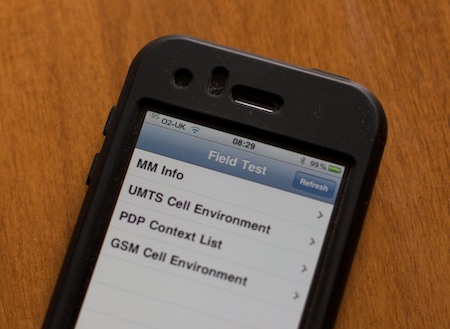
iPhone users who want to know a bit more can dial *3001#12345#* on the numeric keypad and press Call, which will bring up Field Test Mode. The bars in the top left will be replaced with a signal strength in dBm - a negative number where the less negative it is, the stronger the signal - and there's a whole menu of other diagnostic information whose merest operational parameters I am not worthy to calculate.

iPhone Field Test mode

Incidentally, there are some discussion threads out there talking about signal strength problems that people have seen after upgrading their iPhone, or after installing the 3.0 software, or if you hold the phone the wrong way... While I'm sure some people do have real problems, I've just come from a Nokia E71, which was also an excellent phone, and about which people have exactly the same discussions.

I, for one, am loving my iPhone 3GS...

ServerBar

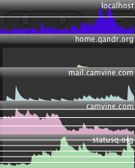
serverbarMichael has made his rather nice ServerBar utility available.

If you have a Mac and you manage Unix-type machines (including other Macs, of course), this might be for you. It only really does one thing, but it does it well - it shows you the load on your remote machines - and it gives you a convenient shortcut (by clicking on the graph) to a terminal on any machine. If you know what SSH is, this might be of interest.

Recommended.