A possible solution to slow or unresponsive Hue lights
They used to say that there are two 'internet of things' systems that 'just work' out of the box: the Sonos sound system, and Philips Hue lighting. I'm fortunate enough to own both of them, and I would add the Honeywell Evohome heating system (though one of my friends has had a few complications with an unusually large installation).
When we moved house recently, though, my previously-faultless Hue system seemed to become a bit less reliable. Admittedly, we have rather more bulbs now (33 and counting), but that's nowhere close to the limit it can handle. Our bulbs are always powered, so the cunning mesh networking should make sure that nothing is out of signal range. Yet sometimes lights weren't obeying their commands promptly, switch presses needed to be repeated, and things generally seemed, well, a bit sluggish. I was beginning to think it might be time to wipe the configuration off my bridge and start again from scratch. It probably does have a lot of accumulated junk on there...
And then I did a little research and realised something that I should have thought about earlier.
Zigbee (the wireless networking used by Hue and a variety of other systems) runs at approx 2.4Ghz: the same frequency range as Wifi. Like Wifi, it has a number of channels, and if your wifi router and your Zigbee hub have overlapping channels, they can interfere with each other. I found this useful diagram online (apologies for not knowing its creator):
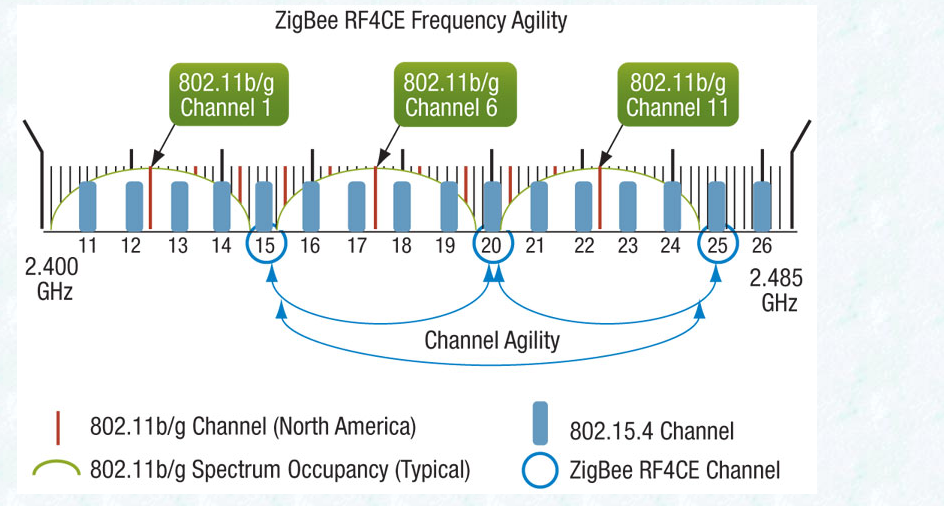
'802.11b/g', in case you don't know it, is part of the technical standard popularly known as Wifi, so the green labels show Wifi channels, and the blue bars show Zigbee.
The number and availability of channels vary depending on your country, but they will be similar to the above. Although Wifi has about a dozen channels, the nearby ones overlap substantially, so most installations only use 1, 6 or 11: if both you and your neighbour are using Wifi channel 1, you won't make much difference by switching to 2 or 3; you need to go at least as far as 6. Go much further than 6, and you'll start interfering with your other neighbour on channel 11. Usually, these days, wifi routers are pretty good at picking their channel by finding the least congested space, though you may need to reboot them from time to time to encourage them to do so.
Anyway, one thing that had changed in my new house was the Wifi. And when I looked, sure enough, my Wifi router was on channel 11 and my Hue hub was on a Zigbee channel that was rather too close for comfort. By going into the Hue app and looking at the settings for my Bridge, I was able to change the Zigbee channel to number 15, and things are going a lot more swimmingly now!
Hope that might help someone else...
Update: As Nigel points out in the comments, if you have 5GHz wifi available, moving as many of your devices as possible to that will also help!
Comments
Fred - there's no reason for the Zigbee to be slow, especially if you've picked the channels carefully on 2.4 GHz, or you're using 5 Ghz. The Hue lights should work pretty much instantaneously. Do they do that if you use the app or a Hue switch?
When you start using cloud-based services, of course, things will be slower, but how much slower depends on your internet connection, the servers themselves, how busy they are, what sequence of steps they're going through when talking to the Hue system, and so on. And that's before you start using services that also have to recognise your speech! Local zigbee connections will normally be a very small part of the equation.
I don't have any experience of Google Voice. But I do have about 30 Hue lights in a busy wifi environment, and if I control them with Alexa, I sometimes see small delays, but never more than about 2 or 3 seconds. I can imagine longer delays if, say, a cloud service was turning on and off each light in a group individually rather than as a group. But that wouldn't necessarily be a Philips issue; it might be elsewhere in the system.
Just my tuppence-worth.
Andrew -
My understanding -- and I may be wrong -- is that each Zigbee controller (the Hue hub, in this case) manages its own Zigbee mesh. Mains-powered devices (like Hue bulbs) can act as 'routers' and forward messages to and from the controller for those devices that would otherwise have too weak a signal. Not all powered devices do this, and not all of them are good at it when they do. But I think the Hue bulbs work well. The meshes are distinct networks, though.
So, in an ideal world and if your 2.4GHz space isn't too crowded, I'd suggest you want different channels, so your two separate meshes are less likely to interfere with each other. You also want to try and separate them geographically: use each hub for the devices that are close to it.
But if your 2.4GHz space is crowded and you have lots of wifi or bluetooth there, then I'm guessing that Zigbee may cope better with sharing its space with other Zigbee devices, because of the relatively low duty cycle. So it's probably better to have a Zigbee network sharing with another Zigbee network than with a wifi channel.
That would be my guess, anyway!
Q