Posts from November 2011

Silicon heating

In the study/shed at the end of my garden, I've just turned off an elderly Pentium-based PC which consumed about 200-300W.

The result is that I now need to turn up the heating.

Is this foolish? I mean, the vast majority of energy used by CPUs, RAM, hard disks and PSU emerges in the form of heat in the room in which they're located. Will my underfloor heating be more efficient? In the same way, I've been replacing my nice old filament lightbulbs with expensive and less-pretty LEDs. I know it makes sense in the summer, but in the winter...?

Of course, the problem with the PC was that it was indiscriminate in its heating tendencies - for the last few months I've often been sitting in here with the door or window open - whereas the real heating is thermostatically controlled. On the other hand, the PC could actually do useful work as a side effect - run backups, for example.

I've often thought that in houses of the future, computing power should be combined with the heating and air-conditioning systems: it would make much more sense to have them in the same room and then distribute pixels and heat from the same source. (Which is partly why I'm looking forward to future DisplayLink chips with full ethernet support).

In the meantime, how about a thermostatically-controlled PC? Has anyone done this? It would be off on hot summer days, come on as the temperature dropped, and you could schedule certain tasks - backups, downloads, compressing the TV programs you've captured, ripping DVDs, re-indexing document collections, uploading photos to the cloud - to run at times based at least to some degree on the usefulness of the energy consumption involved.

I feel a patent coming on...
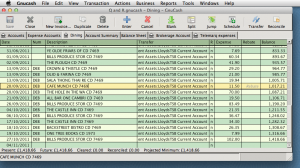
Multiple GnuCash files on Mac OS X

This is one of these 'just in case you're Googling for it' posts. Most readers can probably ignore!

I've been experimenting again with GnuCash, the Open Source accounting package that runs on the Mac, Windows, Linux and others. There's rather a paucity of good accounting packages for Mac users, especially now that the good old MYOB ("Mind Your Own Business") is no more, but last time I looked at GnuCash it was something that you'd have to be a pretty die-hard Open Source enthusiast to want to use.

Well, it's come on a long way, and I've been merrily importing statements downloaded from my banks and setting it up for both personal and business use. If you're familiar with double-entry bookkeeping it all works very nicely, and it stores all the data in Gzipped XML files, so I can be pretty confident that I could get it out and into another format if I ever needed too.

Only one hiccup so far - the standard build for the Mac (which no longer requires X11) assumes that you only want one set of accounts (ie. one file) open at one time, and it helpfully closes your current project when you open a new one. But it can be very handy to have your personal account and business account, or more than one business, open at the same time, especially if you're shifting money between them.

Here's how to do it:

Instead of running the GnuCash app and using File > Open, start it from the command line, e.g.:

open -a Gnucash -n --args MyBusiness.gnucash
open -a Gnucash -n --args Personal.gnucash
The '-n' means 'start a new instance even if the app is already running'. Note that some of the preferences etc are still per-user rather than per-file, but assuming you're not doing anything too complex, this works fine. You could use Automator to create a handy one-click launcher in your dock for each account to do the same thing. Or, create an Automator application using the 'Run Shell Script' action, and specify the script as:
open -a Gnucash -n --args $*
Save the application, and any .ledger files dropped onto it will be opened in their own session.

Recycling the recyclers

I glanced out of my window this morning as the dustmen were going down the street emptying the recycling bins and boxes. One of them was tipping the contents of a big black recycling box into the back of the truck when it slipped from his grasp and followed its contents into the crusher. He shrugged and moved on to the next one.

The moral of the story being... If you find yourself without one, don't assume your neighbors have pinched it!