Let there be Lightroom
In the photography world, there are two big contenders for organising your digital photos - Apple's Aperture, and Adobe's Lightroom. There are also apps like iPhoto and Picasa which tend to appeal more to the mass market, not least on the basis of price, and there are some with niche followings - Bibble Pro, for example, now owned by Corel - but in general the majority of professionals or keen amateurs tend to opt either for Aperture or Lightroom. They've been made more accessible recently by a bit of a price war: when I purchased Aperture it was over 150 quid, but can now be had on the Mac app store for £54.99. Lightroom 3 is rather more pricey in general, but is available at around £100 for the next couple of weeks, no doubt because version 4 is about to be released.
I've been an Aperture user almost since it first came out - it's a lovely program, and has always done what I needed it to. There are some areas where I think it definitely beats Lightroom - general ease of use, book and calendar printing, geotagging, syncing with iDevices etc - and does so for half the price. I have found very little in Lightroom that Aperture can't do equally well.
But it does have a couple of limitations. The first is that it's Mac-only, so if I ever had to move to Windows, I would need to migrate. And the second is that Aperture can, on occasion, be decidedly slow. It keeps improving, and with a bit of careful tweaking (like turning off the Face Recognition functions), can be made run at an acceptable speed on my machines, but it's worth pointing out that my current Macs are pretty fast ones, and those with more elderly hardware might well find it a trial.
So I've been experimenting with Lightroom for a couple of days, and have decided to try switching to it, even though I know that adopting any Adobe product is likely to prove expensive in the long run!
If you search the web, you can find various bits of advice on how to do a migration - there are various people who have gone in either direction and documented the process. You can't take everything with you. Each app has its own set of effects, filters, and adjustments, and they work not by changing the original files, but by storing in a database the tweaks that you apply and displaying those. Most of the crops, colour balancing, vignettes and exposure changes cannot, therefore, be moved from one to the other, unless you export the tweaked versions as separate files alongside the originals. (One way to do this is to create a Smart Album using the 'Adjustments: are applied' filter, and then export TIFFs or JPEGs of anything it contains.)
Any organisational arrangements - folders, books, albums, or smart folders - except those represented directly by filesystem folders, will also not be transferred. But some things can be ported across: metadata such as keywords, copyright information, and geotagging (location information), because there are standard ways of storing such things that both programs respect. It's quite possible, in fact, to have your master files in one place on the hard disk and open them in either Aperture or Lightroom as the mood takes you, depending on which facilities you need. That way, I think, madness probably lies, unless you're very careful.
There's also a slight complication in that geotagging has been very important for me in recent years. Nearly 8000 of my images have accurate latitude and longitude attached, and I don't want to lose that. But I have Canon RAW files, Panasonic Lumix raw files, and a variety of JPEG vintages, and the EXIF extensions which support GPS information have not historically been equally well supported by all of these, or by the software which interprets them. Sometimes a JPEG can store it, sometimes it can't.
So, in case anyone else is considering a similar move, this is my plan for the migration.
- In Aperture, use keyword tags to mark organisational features that you want to be preserved. Remember, an album called "Bob's Wedding" won't come across, but tags will. So go to each album, select all the photos, and tag them. You can then always recreate the organisational structure in LR if wanted, or just search using tags.
- Use Aperture's File > Export > Master... command to copy the original images to a new location. For the metadata option, choose the 'Create IPTC4XMP Sidecar File' option. This will create, alongside each image, an XML file with the same name but a .XMP extension, which contains your metadata, including your ratings, keywords, and location info. It largely gets around the fact that different image formats can store different amounts of metadata, so hopefully the important stuff should be preserved. The process can take some time: from some sample experiments, my 22,000 images will take about 11 hours to export. Then, when you import each photo into Lightroom, the sidecar file will automatically be read and associated with the image. Some people, in fact, prefer to keep sidecar files with every image, so that the original file is never touched and the metadata is in an open, human-readable format which can easily be moved around. Lightroom can be told to keep the sidecar file up to date as you make changes, but you do run the risk then of having metadata in the image file, or in the app's database, or in the sidecar file getting out of sync, and sidecar files are only maintained by Lightroom for RAW formats, not for JPEGs, TIFFS, PSDs or DNGs.
- Import the images into Lightroom as DNGs. I chose to convert to the open DNG (Digital Negative) format rather than keep the individual camera-manufacturer's RAW files. No information is, in theory, lost by this process, and it seems to me more likely that, many years from now, software will be able to read it. In addition, it is good at storing metadata, so should reduce the issue of having multiple copies of that stuff around. It does, however, involve another copy, and a conversion, of the big image files. I imagine this may take really quite a long time! And remember, you will now be creating your third copy of the originals, so make sure you have plenty of disk space. But it can be useful to do it in stages, anyway, because you may want to build up a keyword hierarchy in Lightroom. For example, some of my first photos were tagged with 'Sydney'. I created a keyword hierarchy which put this under 'Places > Australia', and future imports then use that. You can always move things around later, but it may be easiest to do so before the list gets too big.
- Delete whichever of the earlier copies of the images you no longer need. (Having made sure you have a good backup, of course.)

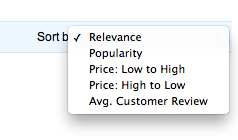 I buy masses of stuff through Amazon. And I do take note of the reviews left by others. When you do a search, you can choose to order the results by average customer review, which is almost useful, but not quite.