Thought for the day
A good holiday is when you can't remember whether it's Sunday or Monday.
Quentin Stafford-Fraser's blog
One should always have something sensational to read on the net...
A good holiday is when you can't remember whether it's Sunday or Monday.
 The harbour, Getaria, Spain.
Dickon's comment on my last post reminded me of another post from four years ago.
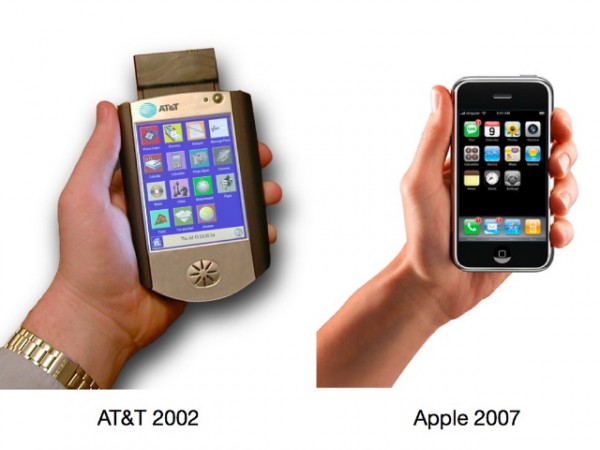
Imitation is the sincerest form of flattery, they say, but it can also be the most expensive.
Dear Apple, a billion dollars would be nice, but I think the Broadband Phone team would probably settle for some nice new MacBook Pros...
:-)
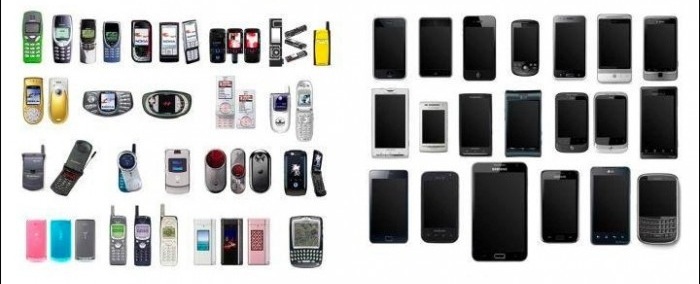
As he says, imitation is the sincerest form of flattery...
Mac tip of the week...
The Spotlight search engine is a really useful feature of Mac OS X, providing an easy way to open your files, email messages etc. But suppose you want to do something other than open them: how do you find out where they actually are? Is it showing you the copy on your internal drive, or your external drive? What other things are in the same folder? Can I copy it onto a flash drive?
A quick note for new Mac users: the 'Option' key is labelled 'Alt' on some keyboards.
Here’s a handy utility for those using Mountain Lion’s new Notifications system (something I find I rather like despite never really getting on with Growl).
It’s called ‘terminal-notifier’ by Eloy Durán, and it lets you send these from the command line. So, for example:
   $ terminal-notifier \
     -message “Shall I compare thee to a summer’s day?” \
     -title “Morning greeting” -execute “open http://bbc.co.uk/weather/2653941”
This pops up a little notification, and clicking on it will take you to the BBC weather forecast for Cambridge.
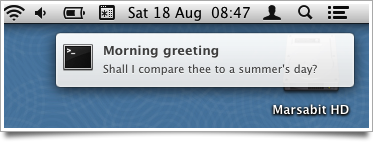
You could put the command all on one line - I’ve just split it up with backslashes for readability. It’s easy to install terminal-notifier from the command line with:
$ sudo gem install terminal-notifier
Now, as an illustration of why it can be useful, I wanted this for a particular purpose:
I’ve been experimenting more and more with Multimarkdown, since so much of what I write ends up in HTML, and the markdown syntax is a convenient way to create it. I have an Automator service which takes the currently selected text, for example in a blog post text-entry field, parses it as Markdown, and replaces it with the HTML equivalent. I’ve assigned it a keystroke, so typically I’ll just do Cmd-A to select everything I’ve typed and Ctrl-Alt-Cmd-M to convert it to nice HTML. Very handy. It’s how I wrote this.
Just occasionally, however, I might want to go back to the Markdown version, so before conversion the selected text is also copied into the clipboard. This is the kind of quick temporary backup that becomes second nature if you have a clipboard history utility. But it’s easy to forget this has happened.
Now, I can just add a quick extra line in the automator script and I get a little pop-up to remind me, which vanishes again after a few seconds:
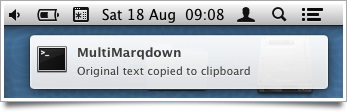
Thanks, Eloy!
Here's what the Automator service looks like, in case anyone wants to do something similar: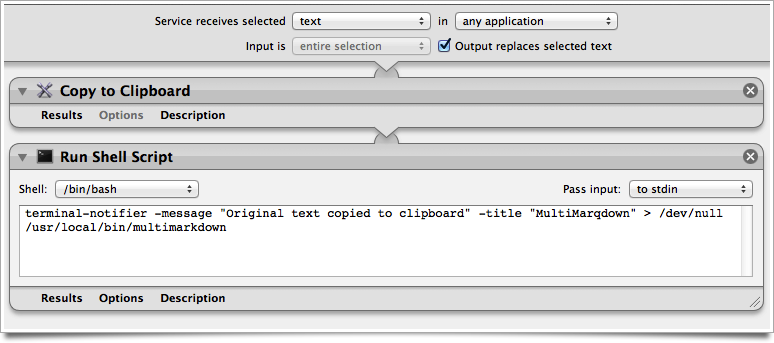
Most of you have probably heard by now about how the technology reporter Mat Honan's accounts were hacked and how he lost his Google Mail, his Apple and Amazon account, his Twitter account and the contents of his iPhone and laptop. All in under one hour.
What's fascinating about this story is that we know how it was done: there was no heavy brute-force attack on weakly-encypted passwords, no SQL injections on his company's website. The hackers had no animosity towards him; they didn't know who he was, they just liked his three-letter @mat Twitter ID. In other words, this could easily happen to you too!
If you haven't heard the story, then I recommend listening to episode 364 of Security Now, which you can get from here or here. The discussion starts 30 mins into the programme.
You should probably listen to this if you, say, use the Internet...
This one's from Douglas Adams.
There's a set of rules that anything that was in the world when you were born is normal and natural. Anything invented between when you were 15 and 35 is new and revolutionary and exciting, and you'll probably get a career in it. Anything invented after you're 35 is against the natural order of things.